Appearance
Microsoft Sentinel
Realm Security integrates seamlessly with Microsoft Sentinel, enabling intelligent routing and analysis of security event logs. Follow these steps carefully to configure log forwarding to your Sentinel instance from Realm Security Data Fabric.
Note
Realm supports sending logs to 104 Microsoft managed tables via the MS Sentinel Log Ingestion API. Unfortunately there are a set of tables like MicrosoftGraphActivityLogs & SigninLogs that Microsoft provides Read only access to. Only Microsoft services/pipelines are allowed to send logs to those tables. That was the source of confusion in regards to whether Microsoft managed tables are supported or not.
Prerequisites
- Administrative access to your Azure console
- An existing Log Analytics Workspace
Overview
- Azure Console: Create Microsoft Entra app registration
- Azure Console: Create DCR (Azure Native table or Custom table) to send data to target table
- Azure Console: Assign Permissions to DCR
- Realm Console: Setup Microsoft Sentinel output feed
- (Optional) Azure Console: Store
RealmMetadatain a Microsoft native table
1. Azure: Create Microsoft Entra App Registration
- Log in to the Azure console.
- Navigate to App Registrations > New registration.
- Give the app a name and click Register.
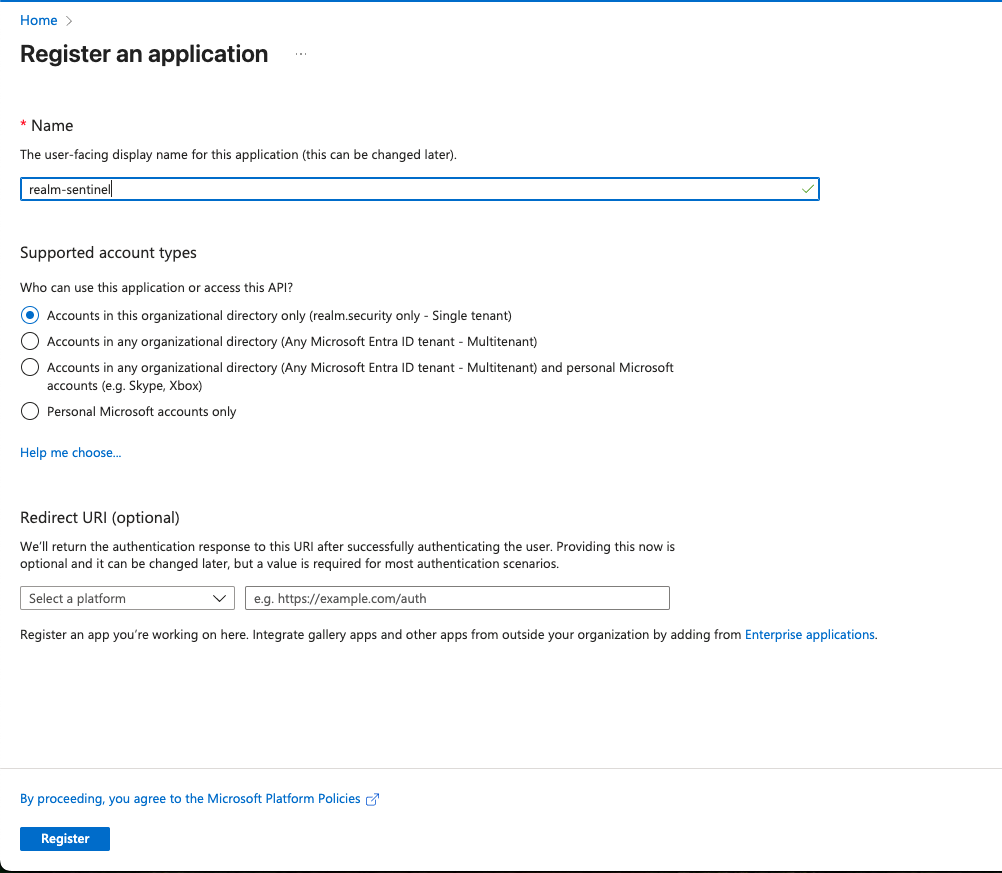
- Navigate to the newly created App Registration.
- Copy and store the Application (Client) ID and Directory (Tenant) ID. You will need these later when configuring the MS Sentinel output feed in the Realm console.
- Navigate to Manage > Certificates and secrets. Select the Client secrets tab and click New client secret.
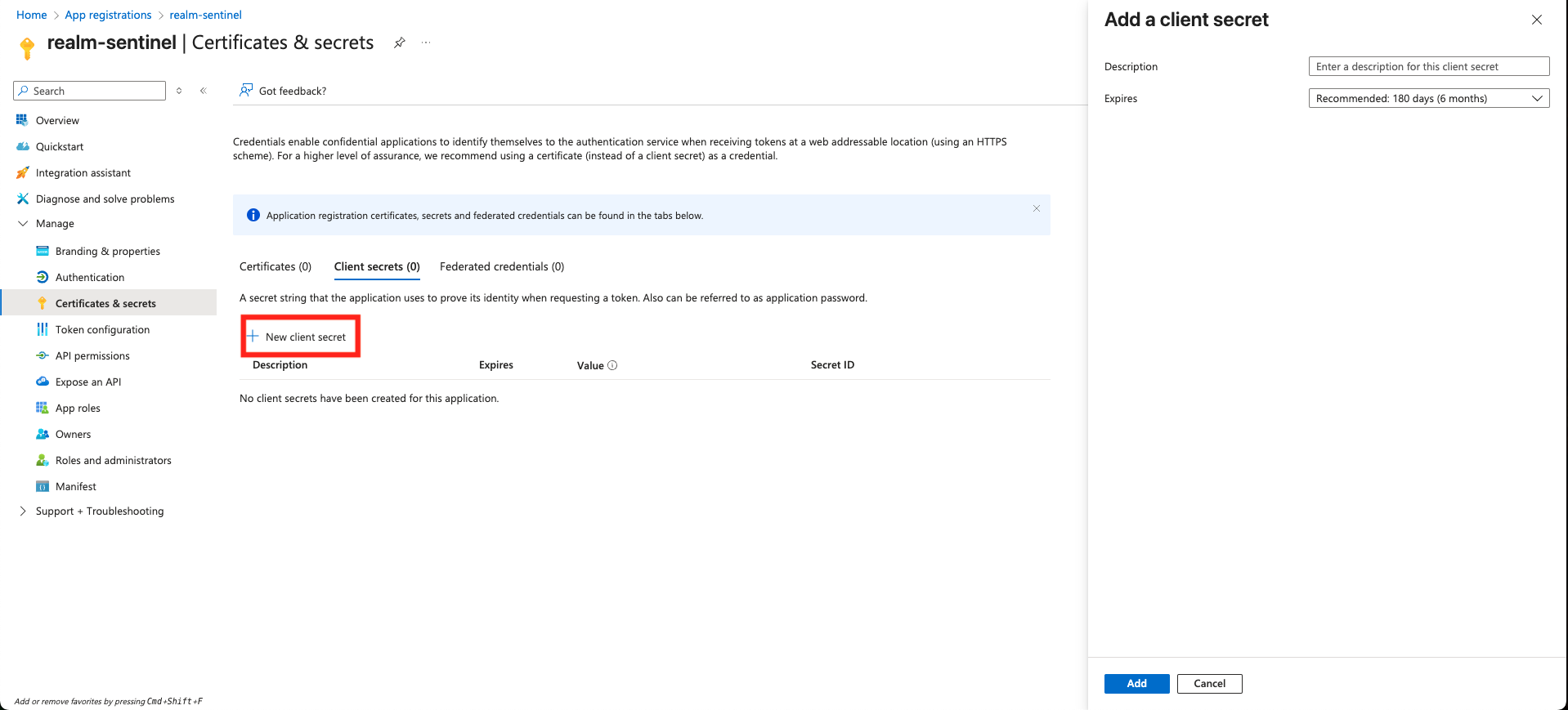
- Give the secret an optional description and select an expiration duration.
- Immediately copy and store the secret Value — it is only shown once and cannot be retrieved after you leave the page. You will need this when configuring the MS Sentinel output feed in the Realm console.
2. Azure: Create a DCR and Target Table
Important: Realm only supports the DCR logs ingestion endpoint. Do not use a Data Collection Endpoint (DCE) URL — ingestion will fail if you do. The DCR logs ingestion endpoint is generated automatically when you create a DCR with
"kind": "Direct". It can be found in the DCR's JSON view in the Azure portal underproperties.logsIngestion.endpoint.
Choose one of the following paths depending on whether you are sending logs to a Microsoft native table or a custom table you create yourself.
Path A: Send to a Microsoft Native Table (e.g. CommonSecurityLog)
Use this path if you want logs to land in a built-in Microsoft Sentinel table like CommonSecurityLog.
- In the Azure console, search for "Deploy a custom template" and select Build your own template in the editor.
- Paste the appropriate Realm-provided DCR template for your source type into the editor.
- In the
parametersblock, replace the default values for:dcrName— a name for your DCR (e.g.Rlm-Palo-CEF-DCR)location— must exactly match the region of your Log Analytics workspace (e.g.EastUS)workspaceResourceId— the full resource ID of your Log Analytics workspace. Find this by navigating to your Log Analytics workspace → JSON view → copy the value ofid(e.g./subscriptions/00000000-.../resourceGroups/.../providers/Microsoft.OperationalInsights/workspaces/yourworkspace)logAnalyticsDestinationName— a friendly name for the destination within the DCR (e.g.my-workspace)inputStreamName— the name of your custom input stream. Must be prefixed withCustom-(e.g.Custom-PaloCEFDCR). This is the value you will enter as the stream name in the Realm console later.
- Click Save.
- Select your Resource Group and click Review + create. Once validation passes, click Create.
- Once deployment completes, navigate to the DCR resource in the Azure console and confirm it is visible.
- Open the DCR and click JSON view (top right of the overview page). Locate and copy the following — you will need all three to configure the Realm output feed:
- Immutable ID: found at
properties.immutableId(e.g.dcr-abc123...) - Logs Ingestion URL: found at
properties.logsIngestion.endpoint(e.g.https://my-dcr-name.eastus-1.ingest.monitor.azure.com) - Stream name: found at
properties.dataFlows[0].streams[0]— this is the value you set forinputStreamName(e.g.Custom-PaloCEFDCR)
- Immutable ID: found at
Note: Microsoft native tables do not have a
RealmMetadatacolumn. The Realm DCR templates map it to aRealmMetadata_CFcolumn, which you must add to the table before the data is stored. See Optional: Store RealmMetadata in a Native Table.
Path B: Send to a Custom Table
Use this path if you want logs to land in a custom table you define yourself (table name must end in _CL).
Step 1: Create the Custom Table
- In the Azure console, search for "Deploy a custom template" and select Build your own template in the editor.
- Paste the appropriate Realm-provided table template for your source type into the editor.
- Update the following:
parameters.tableName.defaultValue— replace with your desired table name. Must end in_CL(e.g.PaloCEFTable_CL).resources[0].properties.schema.columns[]— update to match your desired schema if needed.
- Click Save.

- Select your Resource Group. Set Workspace Name to your Log Analytics workspace name (e.g.
my-workspace). - Click Review + create. Once validation passes, click Create.
- Before proceeding, confirm the table appears under your Log Analytics Workspace → Settings → Tables. Do not proceed until it is visible.
Step 2: Create the DCR
In the Azure console, search for "Deploy a custom template" and select Build your own template in the editor.
Paste the appropriate Realm-provided DCR template for your source type into the editor.
In the
variablesblock, replace the following values:dcrName— a name for your DCR (e.g.PaloAltoCEF-API-Ingestion)location— must exactly match the region of your Log Analytics workspace (e.g.EastUS)workspaceResourceId— the full resource ID of your Log Analytics workspace. Find this by navigating to your Log Analytics workspace → JSON view → copy the value ofid(e.g./subscriptions/00000000-.../resourceGroups/.../providers/Microsoft.OperationalInsights/workspaces/yourworkspace)inputStreamName— the name of your custom input stream. Must be prefixed withCustom-(e.g.Custom-PaloCEFDCR). This is the value you will enter as the stream name in the Realm console later.outputTableName— for documentation purposes only. This value is not read by the deployment. The field that actually controls where data lands isdataFlows[0].outputStreamin step 7 below.
Manually rename the key under
resources[0].properties.streamDeclarationsto exactly match the value you set forinputStreamName. This is a literal JSON key — it will not update automatically when you change the variable. For example, if you setinputStreamNametoCustom-MyStream, the key must be:json"streamDeclarations": { "Custom-MyStream": { "columns": [...] } }
Update
resources[0].properties.streamDeclarations.<inputStreamName>.columns[]to match your custom table's schema.Update
resources[0].properties.dataFlows[0].transformKqlto project the columns by name that match your table schema.Update
resources[0].properties.dataFlows[0].outputStreamto your table name with both aCustom-prefix and_CLsuffix (e.g.Custom-PaloCEFTable_CL). This is what controls where the data actually lands.Click Save.

Select your Resource Group and click Review + create. Once validation passes, click Create.
Before proceeding, confirm the DCR is visible in the Azure console.
Open the DCR and click JSON view (top right of the overview page). Locate and copy the following — you will need all three to configure the Realm output feed:
- Immutable ID: found at
properties.immutableId(e.g.dcr-abc123...) - Logs Ingestion URL: found at
properties.logsIngestion.endpoint(e.g.https://my-dcr-name.eastus-1.ingest.monitor.azure.com) - Stream name: found at
properties.dataFlows[0].streams[0]— this is the value you set forinputStreamName(e.g.Custom-PaloCEFDCR)
- Immutable ID: found at


3. Azure: Assign Permissions to DCR
After the DCR has been created, the app registration must be granted permission to send data to it.
Note: If you skip this step or assign the role at the wrong scope, you will see an
Authentication failureerror in the Realm console.
- Navigate to your DCR resource in the Azure portal.
- Select Access Control (IAM) > Add role assignment.
- Search for and select Monitoring Metrics Publisher, then click Next.
- Set Assign access to to
User, group, or service principaland click Select members. - Search for and select the app registration you created in Step 1, then click Select.
- Click Review + assign and confirm the details before saving.
- Verify the assignment: on the DCR's Access Control (IAM) page, click Role assignments and confirm your app registration appears with the Monitoring Metrics Publisher role. Role assignments can take a few minutes to propagate — wait 5 minutes before testing.
4. Realm: Setup Output Feed
- Go to Destinations and select a destination of type SIEM.
- Click Add Output Feed.
- Select type: Microsoft Sentinel.
- Give the output feed a name and description of your choosing.
- Paste the Logs Ingestion URL you copied from the DCR JSON view into the Endpoint field. This should look like
https://my-dcr-name.eastus-1.ingest.monitor.azure.com. Do not use a DCE URL — if your URL contains a zone suffix like.z1.it is a DCE URL and will not work. - Paste the DCR Immutable ID into the DCR Immutable ID field. This should start with
dcr-. - Paste the client secret value into the Secret Value field.
- Paste the Tenant ID and Client ID into their corresponding fields.
- Select JSON as the format.
- Click Add to save the output feed.
- Once saved, click Edit on the output feed. For each connected source, enter the stream name in the Stream Name field. This is the value you copied from
properties.dataFlows[0].streams[0]in the DCR JSON view (e.g.Custom-PaloCEFDCR).- For a custom table stream the name will be prefixed with
Custom-(e.g.Custom-PaloCEFDCR) - For a Microsoft native table stream the name will be prefixed with
Microsoft-(e.g.Microsoft-CommonSecurityLog) - The stream name must exactly match what is defined in your DCR's
streamDeclarations— including capitalization
- For a custom table stream the name will be prefixed with

It takes about a minute to deploy the fabric update, after which data should start flowing to Microsoft Sentinel. Allow an additional 30–60 seconds for data to be ingested and indexed before querying with KQL.
Optional: Store RealmMetadata in a Native Table
Every event Realm sends to Microsoft Sentinel includes a RealmMetadata field. It is a JSON-encoded string with the following keys:
| Key | Description |
|---|---|
source | Realm source name |
destination | Realm destination name |
input_feed | Realm input feed name |
output_feed | Realm output feed name |
ingested_at | When Realm received the event |
event_timestamp | The event's own timestamp, also sent as TimeGenerated |
collector | Realm collector name, when the event came through a collector |
Custom tables (Path B): the Realm table templates already include a RealmMetadata column, so no extra steps are needed.
Microsoft native tables (Path A): Azure only stores the columns that exist in the destination table, and any other column is dropped silently. Native tables do not have a RealmMetadata column, and custom columns added to native tables must end in _CF. The Realm DCR templates map RealmMetadata to a RealmMetadata_CF column, so add that column to the table (Step 1). If your DCR was deployed from an earlier version of the Realm templates, also complete Step 2.
Note: Until the
RealmMetadata_CFcolumn exists, Azure drops the value without returning an error. The rest of each event is still stored.
Note: The Realm
CommonSecurityLogDCR templates also mapRealmMetadatainto theAdditionalExtensionscolumn as a string.
Step 1: Add the RealmMetadata_CF Column
- Navigate to your Log Analytics workspace > Settings > Tables.
- Find the destination table (e.g.
AWSCloudTrail), click ... at the end of its row, and select Edit schema. - Click Add a column and enter the following:
Name:
RealmMetadata_CF
Type:dynamic
Description:Realm.Security specific metadata - Click Save.
Note: The Azure portal will automatically append
_CFto the custom column.Note: Not every Microsoft native table accepts custom columns. If Edit schema is unavailable or does not offer Add a column, send the data to a custom table instead (Path B).
Step 2: Map RealmMetadata in the DCR Transformation
Skip this step if you deployed your DCR from the current Realm templates — they already include the mapping. Otherwise, add RealmMetadata_CF = parse_json(tostring(RealmMetadata)) to the DCR's transformKql. parse_json turns the JSON string into an object so you can query its keys directly. Leave RealmMetadata in the DCR's streamDeclarations columns — it is already present in the Realm DCR templates. Otherwise, Azure drops it before the transformation runs.
- For a transformation that uses
extend, add the mapping to theextendand addRealmMetadatato theproject-awaylist. For example, the end of the AWSCloudTrail transformation becomes:text..., OperationName = 'CloudTrail', RealmMetadata_CF = parse_json(tostring(RealmMetadata)) | project-away userIdentity, ..., vpcEndpointId, RealmMetadata - For a transformation that uses
project, addRealmMetadata_CF = parse_json(tostring(RealmMetadata))to theprojectlist.
New DCR not based on a Realm template: make this change in the template before you deploy it in 2. Azure: Create a DCR and Target Table. Otherwise you will need to delete and re-create the DCR.
Step 3: Verify
DCR changes can take a few minutes to take effect, and only apply to newly ingested events. Run the following query, replacing AWSCloudTrail with your table name:
kql
AWSCloudTrail
| where TimeGenerated > ago(15m)
| project TimeGenerated, RealmMetadata_CF, Source = RealmMetadata_CF.source, EventTimestamp = RealmMetadata_CF.event_timestamp
If RealmMetadata_CF has a value but Source is empty, the value was stored as a string. Confirm the transformation uses parse_json(tostring(RealmMetadata)).
5. Troubleshooting
Critical Failure: Authentication failure
The app registration does not have the Monitoring Metrics Publisher role on the DCR. Follow Step 3. Also verify the Client ID, Tenant ID, and Client Secret are correct and that the secret has not expired.
Client Error (400 Bad Request)
This is most commonly caused by one of the following:
- Using a DCE URL instead of the DCR ingestion URL. Check that your endpoint does not contain
.z1.or similar zone suffixes — if it does, you are using a DCE URL. Retrieve the correct URL from the DCR JSON view underproperties.logsIngestion.endpoint. - The stream name does not match what is defined in the DCR's
streamDeclarations. Open the DCR JSON view and confirm the stream name underproperties.dataFlows[0].streams[0]exactly matches what you entered in the Realm console. - The DCR Immutable ID was entered incorrectly. Confirm it starts with
dcr-and matchesproperties.immutableIdin the DCR JSON view.
Data not appearing in the table
Even with a successful 200 response from the API, records can be silently dropped at ingestion time. Check the _LogOperation table in your Log Analytics workspace:
kql
_LogOperation
| where TimeGenerated > ago(1h)
| where Category == "Ingestion"
| where Level == "Warning" or Level == "Error"
Common causes include type mismatches between the data and the table schema, and TimeGenerated values more than 2 days in the past or 1 day in the future.
RealmMetadata missing from the table
Azure drops columns that do not exist in the destination table without returning an error. Microsoft native tables have no RealmMetadata column. Confirm the table has a RealmMetadata_CF column of type dynamic, and that the DCR maps it. See Optional: Store RealmMetadata in a Native Table.
Export Detections for Detection Integrity
Detection Integrity checks your log optimization rules against your Microsoft Sentinel detections, so optimizations never drop data a detection depends on. Export your detections as described below, then upload them to Realm.
Export your Sentinel analytics rules. Both options below can return the rules in more than one page, so make sure you export every page.
- Run the commands for your platform below, setting the subscription ID, resource group, and workspace name variables to match your Sentinel workspace. The signed-in account needs the Microsoft Sentinel Reader role (or higher) on the workspace.
- The API returns rules in pages but the scripts below automates collecting detections across pages. The commands follow each
nextLinkuntil every page is exported, and write one rule per line tosentinel_analytics_rules.jsonl. - If the commands print
Unexpected response, the export is incomplete. Check the role assignment and variables, then run the commands again.
macOS and Linux
Requires the Azure CLI and jq.
shell
az login
SUBSCRIPTION_ID="<subscription-id>"
RESOURCE_GROUP="<resource-group>"
WORKSPACE_NAME="<workspace-name>"

out="sentinel_analytics_rules.jsonl"
: > "$out"
url="https://management.azure.com/subscriptions/$SUBSCRIPTION_ID/resourceGroups/$RESOURCE_GROUP/providers/Microsoft.OperationalInsights/workspaces/$WORKSPACE_NAME/providers/Microsoft.SecurityInsights/alertRules?api-version=2025-09-01"
page=0

while [ -n "$url" ]; do
  page=$((page + 1))
  resp=$(az rest --method get --url "$url" --output json)

  if ! printf '%s' "$resp" | jq -e '.value' >/dev/null 2>&1; then
    echo "Unexpected response on page $page: $resp" >&2
    break
  fi

  printf '%s' "$resp" | jq -c '.value[]' >> "$out"
  printf 'Page %d: %s rules\n' "$page" "$(wc -l < "$out" | tr -d ' ')" >&2
  url=$(printf '%s' "$resp" | jq -r '.nextLink // empty')
done

echo "$(wc -l < "$out" | tr -d ' ') rules written to $out"
Windows
Requires PowerShell 5.1 or later and the Azure CLI.
powershell
az login
$SubscriptionId = "<subscription-id>"
$ResourceGroup = "<resource-group>"
$WorkspaceName = "<workspace-name>"

[Net.ServicePointManager]::SecurityProtocol = [Net.ServicePointManager]::SecurityProtocol -bor [Net.SecurityProtocolType]::Tls12
$ProgressPreference = "SilentlyContinue"

$Token = az account get-access-token --resource "https://management.azure.com/" --query accessToken --output tsv
$Headers = @{ Authorization = "Bearer $Token" }

$Out = Join-Path (Get-Location) "sentinel_analytics_rules.jsonl"
$Lines = [Collections.Generic.List[string]]::new()
$Uri = "https://management.azure.com/subscriptions/$SubscriptionId/resourceGroups/$ResourceGroup/providers/Microsoft.OperationalInsights/workspaces/$WorkspaceName/providers/Microsoft.SecurityInsights/alertRules?api-version=2025-09-01"
$Page = 0

while ($Uri) {
  $Page++

  try {
    $Body = (Invoke-WebRequest -Uri $Uri -Headers $Headers -UseBasicParsing).Content
  } catch {
    $Body = $_.ErrorDetails.Message
    if (-not $Body) { $Body = $_.Exception.Message }
  }

  $Resp = $null
  try { $Resp = $Body | ConvertFrom-Json } catch { }
  if (-not ($Resp -and $Resp.PSObject.Properties.Name -contains "value")) {
    Write-Host "Unexpected response on page ${Page}: $Body"
    break
  }

  foreach ($Rule in $Resp.value) { $Lines.Add(($Rule | ConvertTo-Json -Depth 50 -Compress)) }
  Write-Host "Page ${Page}: $($Lines.Count) rules"
  $Uri = $Resp.nextLink
}

[IO.File]::WriteAllLines($Out, $Lines)
Remove-Variable Token, Headers
Write-Host "$($Lines.Count) rules written to $Out"
Upload the Export to Realm
Upload the exported file or files as described in Upload Detections to Realm, selecting your Microsoft Sentinel destination.
Resources
Custom Table Templates
Realm provided custom table templates.
Palo CEF
json
{
"$schema": "https://schema.management.azure.com/schemas/2019-04-01/deploymentTemplate.json#",
"contentVersion": "1.0.0.0",
"parameters": {
"workspaceName": {
"type": "String",
"metadata": {
"description": "The name of the existing Log Analytics Workspace."
}
},
"tableName": {
"defaultValue": "PaloCEFTable_CL",
"type": "String",
"metadata": {
"description": "The name of the custom table (will be suffixed with _CL)."
}
},
"location": {
"defaultValue": "[resourceGroup().location]",
"type": "String",
"metadata": {
"description": "Location for the table resource."
}
}
},
"resources": [
{
"type": "Microsoft.OperationalInsights/workspaces/tables",
"apiVersion": "2022-10-01",
"name": "[concat(parameters('workspaceName'), '/', parameters('tableName'))]",
"location": "[parameters('location')]",
"properties": {
"schema": {
"name": "[parameters('tableName')]",
"columns": [
{
"name": "TimeGenerated",
"type": "datetime",
"description": "The time at which the log record was generated by the source system."
},
{
"name": "RealmMetadata",
"type": "dynamic",
"description": "Realm.Security specific metadata"
},
{
"name": "PanOSRuleUUID",
"type": "string",
"description": "Custom field to identify the unique UUID of the matched rule on the Palo Alto device."
},
{
"name": "act",
"type": "string",
"description": "CEF Key (act) mapped to DeviceAction: The action mentioned in the event (e.g., Permit, Block, Drop)."
},
{
"name": "app",
"type": "string",
"description": "CEF Key (app) mapped to ApplicationProtocol: The protocol used in the application, such as HTTP or HTTPS."
},
{
"name": "cat",
"type": "string",
"description": "CEF Key (cat) mapped to DeviceEventCategory: Represents the category assigned by the originating device."
},
{
"name": "cefVersion",
"type": "string",
"description": "CEF Version field."
},
{
"name": "cn1",
"type": "string",
"description": "CEF Key (cn1) mapped to DeviceCustomNumber1."
},
{
"name": "cn1Label",
"type": "string",
"description": "CEF Key (cn1Label): Describes the purpose of the custom field cn1."
},
{
"name": "cn2",
"type": "string",
"description": "CEF Key (cn2) mapped to DeviceCustomNumber2."
},
{
"name": "cn2Label",
"type": "string",
"description": "CEF Key (cn2Label): Describes the purpose of the custom field cn2."
},
{
"name": "cn3",
"type": "string",
"description": "CEF Key (cn3) mapped to DeviceCustomNumber3."
},
{
"name": "cn3Label",
"type": "string",
"description": "CEF Key (cn3Label): Describes the purpose of the custom field cn3."
},
{
"name": "cnt",
"type": "string",
"description": "CEF Key (cnt) mapped to EventCount: A count associated with the event."
},
{
"name": "cs1",
"type": "string",
"description": "CEF Key (cs1) mapped to DeviceCustomString1."
},
{
"name": "cs1Label",
"type": "string",
"description": "CEF Key (cs1Label): Describes the purpose of the custom field cs1."
},
{
"name": "cs2",
"type": "string",
"description": "CEF Key (cs2) mapped to DeviceCustomString2."
},
{
"name": "cs2Label",
"type": "string",
"description": "CEF Key (cs2Label): Describes the purpose of the custom field cs2."
},
{
"name": "cs3",
"type": "string",
"description": "CEF Key (cs3) mapped to DeviceCustomString3."
},
{
"name": "cs3Label",
"type": "string",
"description": "CEF Key (cs3Label): Describes the purpose of the custom field cs3."
},
{
"name": "cs4",
"type": "string",
"description": "CEF Key (cs4) mapped to DeviceCustomString4."
},
{
"name": "cs4Label",
"type": "string",
"description": "CEF Key (cs4Label): Describes the purpose of the custom field cs4."
},
{
"name": "cs5",
"type": "string",
"description": "CEF Key (cs5) mapped to DeviceCustomString5."
},
{
"name": "cs5Label",
"type": "string",
"description": "CEF Key (cs5Label): Describes the purpose of the custom field cs5."
},
{
"name": "cs6",
"type": "string",
"description": "CEF Key (cs6) mapped to DeviceCustomString6."
},
{
"name": "cs6Label",
"type": "string",
"description": "CEF Key (cs6Label): Describes the purpose of the custom field cs6."
},
{
"name": "destinationTranslatedAddress",
"type": "string",
"description": "CEF Key (destinationTranslatedAddress): The post-translation destination IPv4 address."
},
{
"name": "destinationTranslatedPort",
"type": "string",
"description": "CEF Key (destinationTranslatedPort): The post-translation destination port."
},
{
"name": "deviceEventClassId",
"type": "string",
"description": "CEF Key (deviceEventClassId): Identifies the type of event reported."
},
{
"name": "deviceExternalId",
"type": "string",
"description": "CEF Key (deviceExternalId): An ID used by the originating device."
},
{
"name": "deviceInboundInterface",
"type": "string",
"description": "CEF Key (deviceInboundInterface): The input interface on the device where the packet was received."
},
{
"name": "deviceOutboundInterface",
"type": "string",
"description": "CEF Key (deviceOutboundInterface): The output interface on the device where the packet was sent."
},
{
"name": "deviceProduct",
"type": "string",
"description": "CEF Key (deviceProduct): Identifies the product of a vendor."
},
{
"name": "deviceVendor",
"type": "string",
"description": "CEF Key (deviceVendor): The vendor of the device generating the event."
},
{
"name": "deviceVersion",
"type": "string",
"description": "CEF Key (deviceVersion): Identifies the version of the product."
},
{
"name": "dpt",
"type": "string",
"description": "CEF Key (dpt) mapped to DestinationPort. Valid values: 0 - 65535."
},
{
"name": "dst",
"type": "string",
"description": "CEF Key (dst) mapped to DestinationIP: The destination IPv4 address."
},
{
"name": "duser",
"type": "string",
"description": "CEF Key (duser) mapped to DestinationUserName."
},
{
"name": "dvchost",
"type": "string",
"description": "CEF Key (dvchost) mapped to DeviceHostName: The FQDN associated with the device node."
},
{
"name": "externalId",
"type": "string",
"description": "CEF Key (externalId): An ID used by the originating device."
},
{
"name": "flexNumber1",
"type": "string",
"description": "CEF Key (flexNumber1) mapped to FlexNumber1."
},
{
"name": "flexNumber1Label",
"type": "string",
"description": "CEF Key (flexNumber1Label): Describes the purpose of the custom field flexNumber1."
},
{
"name": "name",
"type": "string",
"description": "CEF Key (name) mapped to Activity: A human-readable description of the event."
},
{
"name": "out",
"type": "string",
"description": "CEF Key (out) mapped to DeviceOutboundInterface."
},
{
"name": "proto",
"type": "string",
"description": "CEF Key (proto) mapped to Protocol (e.g., TCP, UDP)."
},
{
"name": "reason",
"type": "string",
"description": "CEF Key (reason): The reason the event was generated."
},
{
"name": "rt",
"type": "string",
"description": "CEF Key (rt) mapped to ReceiptTime: The time at which the event was received."
},
{
"name": "severity",
"type": "string",
"description": "CEF Key (severity): A string or integer describing the importance of the event."
},
{
"name": "sourceTranslatedAddress",
"type": "string",
"description": "CEF Key (sourceTranslatedAddress): The post-translation source IPv4 address."
},
{
"name": "sourceTranslatedPort",
"type": "string",
"description": "CEF Key (sourceTranslatedPort): The post-translation source port."
},
{
"name": "spt",
"type": "string",
"description": "CEF Key (spt) mapped to SourcePort. Valid values: 0 - 65535."
},
{
"name": "src",
"type": "string",
"description": "CEF Key (src) mapped to SourceIP: The source IPv4 address."
},
{
"name": "suser",
"type": "string",
"description": "CEF Key (suser) mapped to SourceUserName."
}
]
}
}
}
]
}Data Collection Rule Templates
Realm provided DCR templates.
Palo CEF DCR
Note:
outputTableNamein thevariablesblock is for documentation purposes only — it is not read by the deployment. The value that actually controls where data lands isdataFlows[0].outputStream, which must include both theCustom-prefix and_CLsuffix.
json
{
    "$schema": "https://schema.management.azure.com/schemas/2019-04-01/deploymentTemplate.json#",
    "contentVersion": "1.0.0.0",
    "parameters": {},
    "variables": {
        "dcrName": "PaloAltoCEF-API-Ingestion",
        "location": "EastUS",
        "workspaceResourceId": "/subscriptions/0000000-0000-0000-0000-0000000000000/resourceGroups/fizz/providers/Microsoft.OperationalInsights/workspaces/buzz",
        "logAnalyticsDestinationName": "logAnalyticsWorkspaceName",
        "inputStreamName": "Custom-PaloCEFDCR",
        "outputTableName": "PaloCEFTable"
    },
    "resources": [
        {
            "type": "Microsoft.Insights/dataCollectionRules",
            "apiVersion": "2023-03-11",
            "name": "[variables('dcrName')]",
            "location": "[variables('location')]",
            "kind": "Direct",
            "properties": {
                "streamDeclarations": {
                    "Custom-PaloCEFDCR": {
                        "columns": [
                            { "name": "TimeGenerated", "type": "datetime" },
                            { "name": "RealmMetadata", "type": "dynamic" },
                            { "name": "PanOSRuleUUID", "type": "string" },
                            { "name": "act", "type": "string" },
                            { "name": "app", "type": "string" },
                            { "name": "cat", "type": "string" },
                            { "name": "cefVersion", "type": "string" },
                            { "name": "cn1", "type": "string" },
                            { "name": "cn1Label", "type": "string" },
                            { "name": "cn2", "type": "string" },
                            { "name": "cn2Label", "type": "string" },
                            { "name": "cn3", "type": "string" },
                            { "name": "cn3Label", "type": "string" },
                            { "name": "cnt", "type": "string" },
                            { "name": "cs1", "type": "string" },
                            { "name": "cs1Label", "type": "string" },
                            { "name": "cs2", "type": "string" },
                            { "name": "cs2Label", "type": "string" },
                            { "name": "cs3", "type": "string" },
                            { "name": "cs3Label", "type": "string" },
                            { "name": "cs4", "type": "string" },
                            { "name": "cs4Label", "type": "string" },
                            { "name": "cs5", "type": "string" },
                            { "name": "cs5Label", "type": "string" },
                            { "name": "cs6", "type": "string" },
                            { "name": "cs6Label", "type": "string" },
                            { "name": "destinationTranslatedAddress", "type": "string" },
                            { "name": "destinationTranslatedPort", "type": "string" },
                            { "name": "deviceEventClassId", "type": "string" },
                            { "name": "deviceExternalId", "type": "string" },
                            { "name": "deviceInboundInterface", "type": "string" },
                            { "name": "deviceOutboundInterface", "type": "string" },
                            { "name": "deviceProduct", "type": "string" },
                            { "name": "deviceVendor", "type": "string" },
                            { "name": "deviceVersion", "type": "string" },
                            { "name": "dpt", "type": "string" },
                            { "name": "dst", "type": "string" },
                            { "name": "duser", "type": "string" },
                            { "name": "dvchost", "type": "string" },
                            { "name": "externalId", "type": "string" },
                            { "name": "flexNumber1", "type": "string" },
                            { "name": "flexNumber1Label", "type": "string" },
                            { "name": "activityName", "type": "string" },
                            { "name": "outboundInt", "type": "string" },
                            { "name": "proto", "type": "string" },
                            { "name": "reason", "type": "string" },
                            { "name": "rt", "type": "string" },
                            { "name": "severity", "type": "string" },
                            { "name": "sourceTranslatedAddress", "type": "string" },
                            { "name": "sourceTranslatedPort", "type": "string" },
                            { "name": "spt", "type": "string" },
                            { "name": "src", "type": "string" },
                            { "name": "suser", "type": "string" }
                        ]
                    }
                },
                "destinations": {
                    "logAnalytics": [
                        {
                            "workspaceResourceId": "[variables('workspaceResourceId')]",
                            "name": "[variables('logAnalyticsDestinationName')]"
                        }
                    ]
                },
                "dataFlows": [
                    {
                        "streams": [
                            "[variables('inputStreamName')]"
                        ],
                        "destinations": [
                            "[variables('logAnalyticsDestinationName')]"
                        ],
                        "transformKql": "source \n | project TimeGenerated, PanOSRuleUUID, act, app, cat, cefVersion, cn1, cn1Label, cn2, cn2Label, cn3, cn3Label, cnt, cs1, cs1Label, cs2, cs2Label, cs3, cs3Label, cs4, cs4Label, cs5, cs5Label, cs6, cs6Label, destinationTranslatedAddress, destinationTranslatedPort, deviceEventClassId, deviceExternalId, deviceInboundInterface, deviceOutboundInterface, deviceProduct, deviceVendor, deviceVersion, dpt, dst, duser, dvchost, externalId, flexNumber1, flexNumber1Label, proto, reason, rt, severity, sourceTranslatedAddress, sourceTranslatedPort, spt, src, suser, ActivityName=activityName, RealmMetadata=parse_json(tostring(RealmMetadata))",
                        "outputStream": "Custom-PaloCEFTable_CL"
                    }
                ]
            }
        }
    ]
}
DCR for CommonSecurityLog Table (Palo CEF)
Note: This template maps RealmMetadata to a RealmMetadata_CF column. Add that column to the table, or the value is dropped. See Optional: Store RealmMetadata in a Native Table.
Use this template if you are sending Palo Alto CEF data to the native CommonSecurityLog table.
json
{
    "$schema": "https://schema.management.azure.com/schemas/2019-04-01/deploymentTemplate.json#",
    "contentVersion": "1.0.0.0",
    "parameters": {
        "dcrName": {
            "defaultValue": "Rlm-Palo-CEF-DCR",
            "type": "String",
            "metadata": {
                "description": "Name of the Data Collection Rule."
            }
        },
        "location": {
            "defaultValue": "EastUS",
            "type": "String",
            "metadata": {
                "description": "Location for the DCR. Must match the Log Analytics Workspace region."
            }
        },
        "workspaceResourceId": {
            "defaultValue": "/subscriptions/0000000-0000-0000-0000-0000000000000/resourceGroups/fizz/providers/Microsoft.OperationalInsights/workspaces/buzz",
            "type": "String",
            "metadata": {
                "description": "Full Resource ID of the target Log Analytics Workspace."
            }
        },
        "logAnalyticsDestinationName": {
            "defaultValue": "analytics-workspace-name",
            "type": "String",
            "metadata": {
                "description": "The name used for the destination workspace within the DCR definition."
            }
        },
        "inputStreamName": {
            "defaultValue": "Custom-PaloCEFDCR",
            "type": "String",
            "metadata": {
                "description": "The name of the custom input stream used in the Logs Ingestion API URL."
            }
        }
    },
    "variables": {
        "outputStreamName": "Microsoft-CommonSecurityLog"
    },
    "resources": [
        {
            "type": "Microsoft.Insights/dataCollectionRules",
            "apiVersion": "2023-03-11",
            "name": "[parameters('dcrName')]",
            "location": "[parameters('location')]",
            "kind": "Direct",
            "properties": {
                "streamDeclarations": {
                    "[parameters('inputStreamName')]": {
                        "columns": [
                            { "name": "TimeGenerated", "type": "datetime" },
                            { "name": "RealmMetadata", "type": "dynamic" },
                            { "name": "act", "type": "string" },
                            { "name": "app", "type": "string" },
                            { "name": "cat", "type": "string" },
                            { "name": "cefVersion", "type": "int" },
                            { "name": "cn1", "type": "int" },
                            { "name": "cn1Label", "type": "string" },
                            { "name": "cn2", "type": "int" },
                            { "name": "cn2Label", "type": "string" },
                            { "name": "cn3", "type": "int" },
                            { "name": "cn3Label", "type": "string" },
                            { "name": "cnt", "type": "string" },
                            { "name": "cs1", "type": "string" },
                            { "name": "cs1Label", "type": "string" },
                            { "name": "cs2", "type": "string" },
                            { "name": "cs2Label", "type": "string" },
                            { "name": "cs3", "type": "string" },
                            { "name": "cs3Label", "type": "string" },
                            { "name": "cs4", "type": "string" },
                            { "name": "cs4Label", "type": "string" },
                            { "name": "cs5", "type": "string" },
                            { "name": "cs5Label", "type": "string" },
                            { "name": "cs6", "type": "string" },
                            { "name": "cs6Label", "type": "string" },
                            { "name": "destinationTranslatedAddress", "type": "string" },
                            { "name": "destinationTranslatedPort", "type": "int" },
                            { "name": "deviceEventClassId", "type": "string" },
                            { "name": "deviceExternalId", "type": "string" },
                            { "name": "deviceInboundInterface", "type": "string" },
                            { "name": "deviceOutboundInterface", "type": "string" },
                            { "name": "deviceProduct", "type": "string" },
                            { "name": "deviceVendor", "type": "string" },
                            { "name": "deviceVersion", "type": "string" },
                            { "name": "dpt", "type": "int" },
                            { "name": "dst", "type": "string" },
                            { "name": "duser", "type": "string" },
                            { "name": "dvchost", "type": "string" },
                            { "name": "externalId", "type": "string" },
                            { "name": "flexNumber1", "type": "int" },
                            { "name": "flexNumber1Label", "type": "string" },
                            { "name": "activityName", "type": "string" },
                            { "name": "outboundInt", "type": "string" },
                            { "name": "proto", "type": "string" },
                            { "name": "reason", "type": "string" },
                            { "name": "rt", "type": "string" },
                            { "name": "severity", "type": "string" },
                            { "name": "sourceTranslatedAddress", "type": "string" },
                            { "name": "sourceTranslatedPort", "type": "int" },
                            { "name": "spt", "type": "int" },
                            { "name": "src", "type": "string" },
                            { "name": "suser", "type": "string" }
                        ]
                    }
                },
                "destinations": {
                    "logAnalytics": [
                        {
                            "workspaceResourceId": "[parameters('workspaceResourceId')]",
                            "name": "[parameters('logAnalyticsDestinationName')]"
                        }
                    ]
                },
                "dataFlows": [
                    {
                        "streams": [
                            "[parameters('inputStreamName')]"
                        ],
                        "destinations": [
                            "[parameters('logAnalyticsDestinationName')]"
                        ],
                        "outputStream": "[variables('outputStreamName')]",
                        "transformKql": "source | project TimeGenerated,AdditionalExtensions=tostring(RealmMetadata), Activity=tostring(activityName), ApplicationProtocol=tostring(app), DeviceEventCategory=tostring(cat), DestinationPort=toint(dpt), DestinationIP=tostring(dst), DestinationUserName=tostring(duser), DeviceHostName=tostring(dvchost), Protocol=tostring(proto), Reason=tostring(reason), ReceiptTime=tostring(rt), LogSeverity=tostring(severity), SourcePort=toint(spt), SourceIP=tostring(src), SourceUserName=tostring(suser), DeviceAction=tostring(act), DeviceVersion=tostring(cefVersion), DeviceCustomNumber1=toint(cn1), DeviceCustomNumber1Label=tostring(cn1Label), DeviceCustomNumber2=toint(cn2), DeviceCustomNumber2Label=tostring(cn2Label), DeviceCustomNumber3=toint(cn3), DeviceCustomNumber3Label=tostring(cn3Label), EventCount=toint(cnt), DeviceCustomString1=tostring(cs1), DeviceCustomString1Label=tostring(cs1Label), DeviceCustomString2=tostring(cs2), DeviceCustomString2Label=tostring(cs2Label),DeviceCustomString3=tostring(cs3), DeviceCustomString3Label=tostring(cs3Label), DeviceCustomString4=tostring(cs4), DeviceCustomString4Label=tostring(cs4Label), DeviceCustomString5=tostring(cs5), DeviceCustomString5Label=tostring(cs5Label), DeviceCustomString6=tostring(cs6), DeviceCustomString6Label=tostring(cs6Label), DestinationTranslatedAddress=tostring(destinationTranslatedAddress), DestinationTranslatedPort=toint(destinationTranslatedPort), DeviceEventClassID=tostring(deviceEventClassId), DeviceExternalID=tostring(deviceExternalId), DeviceInboundInterface=tostring(deviceInboundInterface), DeviceOutboundInterface=tostring(deviceOutboundInterface), DeviceProduct=tostring(deviceProduct), DeviceVendor=tostring(deviceVendor), SourceTranslatedAddress=tostring(sourceTranslatedAddress), SourceTranslatedPort=toint(sourceTranslatedPort), RealmMetadata_CF=parse_json(tostring(RealmMetadata))"
                    }
                ]
            }
        }
    ]
}
DCR for CommonSecurityLog Table (Zscaler Cloud NSS)
Note: This template maps RealmMetadata to a RealmMetadata_CF column. Add that column to the table, or the value is dropped. See Optional: Store RealmMetadata in a Native Table.
Use this template if you are sending Zscaler Cloud NSS data to the native CommonSecurityLog table.
json
{
    "$schema": "https://schema.management.azure.com/schemas/2019-04-01/deploymentTemplate.json#",
    "contentVersion": "1.0.0.0",
    "parameters": {
        "dcrName": {
            "defaultValue": "Rlm-Zscaler-NSS-DCR",
            "type": "String",
            "metadata": {
                "description": "Name of the Data Collection Rule for Zscaler NSS."
            }
        },
        "location": {
            "defaultValue": "EastUS",
            "type": "String",
            "metadata": {
                "description": "Location for the DCR."
            }
        },
        "workspaceResourceId": {
            "type": "String",
            "metadata": {
                "description": "Full Resource ID of the target Log Analytics Workspace."
            }
        },
        "logAnalyticsDestinationName": {
            "defaultValue": "la-workspace",
            "type": "String"
        },
        "inputStreamName": {
            "defaultValue": "Custom-ZscalerNSS",
            "type": "String"
        }
    },
    "variables": {
        "outputStreamName": "Microsoft-CommonSecurityLog"
    },
    "resources": [
        {
            "type": "Microsoft.Insights/dataCollectionRules",
            "apiVersion": "2023-03-11",
            "name": "[parameters('dcrName')]",
            "location": "[parameters('location')]",
            "kind": "Direct",
            "properties": {
                "streamDeclarations": {
                    "[parameters('inputStreamName')]": {
                        "columns": [
                            { "name": "TimeGenerated", "type": "datetime" },
                            { "name": "RealmMetadata", "type": "dynamic" },
                            { "name": "vendor", "type": "string" },
                            { "name": "product", "type": "string" },
                            { "name": "version", "type": "string" },
                            { "name": "act", "type": "string" },
                            { "name": "Severity", "type": "string" },
                            { "name": "deviceEventClassId", "type": "string" },
                            { "name": "suser", "type": "string" },
                            { "name": "src", "type": "string" },
                            { "name": "dst", "type": "string" },
                            { "name": "dpt", "type": "int" },
                            { "name": "cat", "type": "string" },
                            { "name": "cs1", "type": "string" },
                            { "name": "cs1Label", "type": "string" },
                            { "name": "cs2", "type": "string" },
                            { "name": "cs2Label", "type": "string" },
                            { "name": "cs3", "type": "string" },
                            { "name": "cs3Label", "type": "string" },
                            { "name": "cs4", "type": "string" },
                            { "name": "cs4Label", "type": "string" },
                            { "name": "cs5", "type": "string" },
                            { "name": "cs5Label", "type": "string" },
                            { "name": "cs6", "type": "string" },
                            { "name": "cs6Label", "type": "string" },
                            { "name": "cn1", "type": "int" },
                            { "name": "cn1Label", "type": "string" },
                            { "name": "flexString1", "type": "string" },
                            { "name": "flexString1Label", "type": "string" },
                            { "name": "flexString2", "type": "string" },
                            { "name": "flexString2Label", "type": "string" },
                            { "name": "spriv", "type": "string" },
                            { "name": "suid", "type": "string" },
                            { "name": "dvchost", "type": "string" }
                        ]
                    }
                },
                "destinations": {
                    "logAnalytics": [
                        {
                            "workspaceResourceId": "[parameters('workspaceResourceId')]",
                            "name": "[parameters('logAnalyticsDestinationName')]"
                        }
                    ]
                },
                "dataFlows": [
                    {
                        "streams": [ "[parameters('inputStreamName')]" ],
                        "destinations": [ "[parameters('logAnalyticsDestinationName')]" ],
                        "outputStream": "[variables('outputStreamName')]",
                        "transformKql": "source | project TimeGenerated, AdditionalExtensions=tostring(RealmMetadata), DeviceVendor=tostring(vendor), DeviceProduct=tostring(product), DeviceVersion=tostring(version), DeviceAction=tostring(act), LogSeverity=tostring(Severity), DeviceEventClassID=tostring(deviceEventClassId), SourceUserName=tostring(suser), SourceAddress=tostring(src), DestinationAddress=tostring(dst), DestinationPort=toint(dpt), DeviceCategory=tostring(cat), DeviceCustomString1=tostring(cs1), DeviceCustomString1Label=tostring(cs1Label), DeviceCustomString2=tostring(cs2), DeviceCustomString2Label=tostring(cs2Label), DeviceCustomString3=tostring(cs3), DeviceCustomString3Label=tostring(cs3Label), DeviceCustomString4=tostring(cs4), DeviceCustomString4Label=tostring(cs4Label), DeviceCustomString5=tostring(spriv), DeviceCustomString5Label='Zscaler_Privilege', DeviceCustomString6=tostring(suid), DeviceCustomString6Label='Zscaler_UID', DeviceCustomNumber1=toint(cn1), DeviceCustomNumber1Label=tostring(cn1Label), FlexString1=tostring(flexString1), FlexString1Label=tostring(flexString1Label), FlexString2=tostring(flexString2), FlexString2Label=tostring(flexString2Label), Computer=tostring(dvchost), RealmMetadata_CF=parse_json(tostring(RealmMetadata))"
                    }
                ]
            }
        }
    ]
}
DCR for AWSALBAccessLogs Table
Note: This template maps RealmMetadata to a RealmMetadata_CF column. Add that column to the table, or the value is dropped. See Optional: Store RealmMetadata in a Native Table.
json
{
  "$schema": "https://schema.management.azure.com/schemas/2019-04-01/deploymentTemplate.json#",
  "contentVersion": "1.0.0.0",
  "parameters": {
    "dcrName": {
      "defaultValue": "Rlm-AWSALB-DCR",
      "type": "String",
      "metadata": {
        "description": "Name of the Data Collection Rule."
      }
    },
    "location": {
      "defaultValue": "EastUS",
      "type": "String",
      "metadata": {
        "description": "Location for the DCR. Must match the Log Analytics Workspace region."
      }
    },
    "workspaceResourceId": {
      "defaultValue": "/subscriptions/0000000-0000-0000-0000-0000000000000/resourceGroups/fizz/providers/Microsoft.OperationalInsights/workspaces/buzz",
      "type": "String",
      "metadata": {
        "description": "Full Resource ID of the target Log Analytics Workspace."
      }
    },
    "logAnalyticsDestinationName": {
      "defaultValue": "analytics-workspace-name",
      "type": "String",
      "metadata": {
        "description": "The name used for the destination workspace within the DCR definition."
      }
    },
    "inputStreamName": {
      "defaultValue": "Custom-AWSALBAccessLogsDCR",
      "type": "String",
      "metadata": {
        "description": "The name of the custom input stream used in the Logs Ingestion API URL."
      }
    }
  },
  "variables": {
    "outputStreamName": "Microsoft-AWSALBAccessLogs"
  },
  "resources": [
    {
      "type": "Microsoft.Insights/dataCollectionRules",
      "apiVersion": "2023-03-11",
      "name": "[parameters('dcrName')]",
      "location": "[parameters('location')]",
      "kind": "Direct",
      "properties": {
        "streamDeclarations": {
          "[parameters('inputStreamName')]": {
            "columns": [
              { "name": "RealmMetadata", "type": "dynamic" },
              { "name": "type", "type": "string" },
              { "name": "TimeGenerated", "type": "datetime" },
              { "name": "elb", "type": "string" },
              { "name": "client_host", "type": "string" },
              { "name": "target_host", "type": "string" },
              { "name": "request_processing_time", "type": "real" },
              { "name": "target_processing_time", "type": "real" },
              { "name": "response_processing_time", "type": "real" },
              { "name": "elb_status_code", "type": "string" },
              { "name": "target_status_code", "type": "string" },
              { "name": "received_bytes", "type": "long" },
              { "name": "sent_bytes", "type": "long" },
              { "name": "request_method", "type": "string" },
              { "name": "request_url", "type": "string" },
              { "name": "request_protocol", "type": "string" },
              { "name": "user_agent", "type": "string" },
              { "name": "ssl_cipher", "type": "string" },
              { "name": "ssl_protocol", "type": "string" },
              { "name": "target_group_arn", "type": "string" },
              { "name": "trace_id", "type": "string" },
              { "name": "domain_name", "type": "string" },
              { "name": "chosen_cert_arn", "type": "string" },
              { "name": "matched_rule_priority", "type": "string" },
              { "name": "request_creation_time", "type": "string" },
              { "name": "actions_executed", "type": "string" },
              { "name": "redirect_url", "type": "string" },
              { "name": "error_reason", "type": "string" },
              { "name": "target_port_list", "type": "dynamic" },
              { "name": "target_status_code_list", "type": "dynamic" },
              { "name": "classification", "type": "string" },
              { "name": "classification_reason", "type": "string" },
              { "name": "traceability_id", "type": "string" }
            ]
          }
        },
        "destinations": {
          "logAnalytics": [
            {
              "workspaceResourceId": "[parameters('workspaceResourceId')]",
              "name": "[parameters('logAnalyticsDestinationName')]"
            }
          ]
        },
        "dataFlows": [
          {
            "streams": [
              "[parameters('inputStreamName')]"
            ],
            "destinations": [
              "[parameters('logAnalyticsDestinationName')]"
            ],
            "outputStream": "[variables('outputStreamName')]",
            "transformKql": "source | extend ClientIp = tostring(split(client_host, ':')[0]), ClientPort = toint(split(client_host, ':')[1]), TargetIp = tostring(split(target_host, ':')[0]), TargetPort = toint(split(target_host, ':')[1]), RequestProcessingTime = tostring(request_processing_time), TargetProcessingTime = tostring(target_processing_time), ResponseProcessingTime = tostring(response_processing_time), ElbStatusCode = toint(elb_status_code), TargetStatusCode = tostring(target_status_code), ReceivedBytes = tolong(received_bytes), SentBytes = tolong(sent_bytes), RequestRaw = strcat(request_method, ' ', request_url, ' ', request_protocol), UserAgent = tostring(user_agent), SslCipher = tostring(ssl_cipher), SslProtocol = tostring(ssl_protocol), TargetGroupArn = tostring(target_group_arn), TraceId = tostring(trace_id), DomainName = tostring(domain_name), ChosenCertArn = tostring(chosen_cert_arn), MatchedRulePriority = tostring(matched_rule_priority), RequestCreationTime = tostring(request_creation_time), ActionsExecuted = tostring(actions_executed), RedirectUrl = tostring(redirect_url), LambdaErrorReason = tostring(error_reason), TargetPortList = tostring(target_port_list), TargetStatusCodeList = tostring(target_status_code_list), Classification = tostring(classification), ClassificationReason = tostring(classification_reason), ConnTraceId = tostring(traceability_id), Alb = tostring(elb), ALBType = tostring(type), RealmMetadata_CF = parse_json(tostring(RealmMetadata)) | project-away client_host, target_host, request_method, request_url, request_protocol, RealmMetadata"
          }
        ]
      }
    }
  ],
  "outputs": {
    "dcrResourceName": {
      "type": "string",
      "value": "[parameters('dcrName')]",
      "metadata": {
        "description": "The Azure resource name of the DCR. NOT valid in the ingestion URL path \u2014 use dcrImmutableId instead."
      }
    },
    "dcrImmutableId": {
      "type": "string",
      "value": "[reference(resourceId('Microsoft.Insights/dataCollectionRules', parameters('dcrName'))).immutableId]",
      "metadata": {
        "description": "The value that MUST go in the /dataCollectionRules/{this}/streams/... segment of the ingestion URL."
      }
    },
    "logsIngestionEndpoint": {
      "type": "string",
      "value": "[reference(resourceId('Microsoft.Insights/dataCollectionRules', parameters('dcrName'))).endpoints.logsIngestion]",
      "metadata": {
        "description": "The auto-provisioned logs ingestion base URL for this Direct-kind DCR (no separate DCE)."
      }
    },
    "inputStreamName": {
      "type": "string",
      "value": "[parameters('inputStreamName')]",
      "metadata": {
        "description": "The exact, case-sensitive stream name segment for the ingestion URL."
      }
    },
    "fullIngestionUrl": {
      "type": "string",
      "value": "[concat(reference(resourceId('Microsoft.Insights/dataCollectionRules', parameters('dcrName'))).endpoints.logsIngestion, '/dataCollectionRules/', reference(resourceId('Microsoft.Insights/dataCollectionRules', parameters('dcrName'))).immutableId, '/streams/', parameters('inputStreamName'), '?api-version=2023-01-01')]",
      "metadata": {
        "description": "Copy this directly into the client config \u2014 avoids hand-assembling the path from separate values."
      }
    }
  }
}
DCR for AWSCloudTrail Table
Note: The DCR for AWSCloudTrail table currently does not support parsing the requestParameters of a CloudTrail event. Fields like SourcePort and DestinationPort won't be present in the table.
Note: This template maps RealmMetadata to a RealmMetadata_CF column. Add that column to the table, or the value is dropped. See Optional: Store RealmMetadata in a Native Table.
json
{
    "$schema": "https://schema.management.azure.com/schemas/2019-04-01/deploymentTemplate.json#",
    "contentVersion": "1.0.0.0",
    "parameters": {
        "dcrName": {
            "defaultValue": "Rlm-AWSCloudTrail-DCR",
            "type": "String",
            "metadata": {
                "description": "Name of the Data Collection Rule."
            }
        },
        "location": {
            "defaultValue": "EastUS",
            "type": "String",
            "metadata": {
                "description": "Location for the DCR. Must match the Log Analytics Workspace region."
            }
        },
        "workspaceResourceId": {
            "defaultValue": "/subscriptions/0000000-0000-0000-0000-0000000000000/resourceGroups/fizz/providers/Microsoft.OperationalInsights/workspaces/buzz",
            "type": "String",
            "metadata": {
                "description": "Full Resource ID of the target Log Analytics Workspace."
            }
        },
        "logAnalyticsDestinationName": {
            "defaultValue": "analytics-workspace-name",
            "type": "String",
            "metadata": {
                "description": "The name used for the destination workspace within the DCR definition."
            }
        },
        "inputStreamName": {
            "defaultValue": "Custom-AWSCloudTrailDCR",
            "type": "String",
            "metadata": {
                "description": "The name of the custom input stream used in the Logs Ingestion API URL."
            }
        }
    },
    "variables": {
        "outputStreamName": "Microsoft-AWSCloudTrail"
    },
    "resources": [
        {
            "type": "Microsoft.Insights/dataCollectionRules",
            "apiVersion": "2023-03-11",
            "name": "[parameters('dcrName')]",
            "location": "[parameters('location')]",
            "kind": "Direct",
            "properties": {
                "streamDeclarations": {
                    "[parameters('inputStreamName')]": {
                        "columns": [
                            { "name": "RealmMetadata", "type": "dynamic" },
                            { "name": "TimeGenerated", "type": "datetime" },
                            { "name": "eventVersion", "type": "string" },
                            { "name": "userIdentity", "type": "dynamic" },
                            { "name": "eventSource", "type": "string" },
                            { "name": "eventName", "type": "string" },
                            { "name": "awsRegion", "type": "string" },
                            { "name": "sourceIPAddress", "type": "string" },
                            { "name": "userAgent", "type": "string" },
                            { "name": "requestParameters", "type": "dynamic" },
                            { "name": "responseElements", "type": "dynamic" },
                            { "name": "additionalEventData", "type": "dynamic" },
                            { "name": "requestID", "type": "string" },
                            { "name": "eventID", "type": "string" },
                            { "name": "readOnly", "type": "boolean" },
                            { "name": "resources", "type": "dynamic" },
                            { "name": "eventType", "type": "string" },
                            { "name": "managementEvent", "type": "boolean" },
                            { "name": "recipientAccountId", "type": "string" },
                            { "name": "sharedEventID", "type": "string" },
                            { "name": "eventCategory", "type": "string" },
                            { "name": "errorCode", "type": "string" },
                            { "name": "errorMessage", "type": "string" },
                            { "name": "apiVersion", "type": "string" },
                            { "name": "vpcEndpointId", "type": "string" },
                            { "name": "tlsDetails", "type": "dynamic" },
                            { "name": "serviceEventDetails", "type": "dynamic" }
                        ]
                    }
                },
                "destinations": {
                    "logAnalytics": [
                        {
                            "workspaceResourceId": "[parameters('workspaceResourceId')]",
                            "name": "[parameters('logAnalyticsDestinationName')]"
                        }
                    ]
                },
                "dataFlows": [
                    {
                        "streams": [
                            "[parameters('inputStreamName')]"
                        ],
                        "destinations": [
                            "[parameters('logAnalyticsDestinationName')]"
                        ],
                        "outputStream": "[variables('outputStreamName')]",
                        "transformKql": "source | extend EventVersion = eventVersion, EventSource = eventSource, EventName = eventName, AWSRegion = awsRegion, SourceIpAddress = sourceIPAddress, UserAgent = userAgent, RequestParameters = tostring(requestParameters), ResponseElements = tostring(responseElements), AdditionalEventData = tostring(additionalEventData), AwsRequestId_ = requestID, AwsEventId = toguid(eventID), ReadOnly = readOnly, Resources = tostring(resources), EventTypeName = eventType, ManagementEvent = managementEvent, RecipientAccountId = recipientAccountId, SharedEventId = toguid(sharedEventID), Category = eventCategory, ErrorCode = errorCode, ErrorMessage = errorMessage, APIVersion = apiVersion, VpcEndpointId = vpcEndpointId, UserIdentityType = tostring(userIdentity.type), UserIdentityPrincipalid = tostring(userIdentity.principalId), UserIdentityArn = tostring(userIdentity.arn), UserIdentityAccountId = tostring(userIdentity.accountId), UserIdentityAccessKeyId = tostring(userIdentity.accessKeyId), UserIdentityInvokedBy = tostring(userIdentity.invokedBy), UserIdentityUserName = tostring(userIdentity.userName), UserIdentityUserId = tostring(userIdentity.userId), UserIdentityStoreArn = tostring(userIdentity.identityProvider), SessionIssuerType = tostring(userIdentity.sessionContext.sessionIssuer.type), SessionIssuerPrincipalId = tostring(userIdentity.sessionContext.sessionIssuer.principalId), SessionIssuerArn = tostring(userIdentity.sessionContext.sessionIssuer.arn), SessionIssuerAccountId = tostring(userIdentity.sessionContext.sessionIssuer.accountId), SessionIssuerUserName = tostring(userIdentity.sessionContext.sessionIssuer.userName), SessionMfaAuthenticated = tobool(userIdentity.sessionContext.attributes.mfaAuthenticated), SessionCreationDate = todatetime(userIdentity.sessionContext.attributes.creationDate), CipherSuite = tostring(tlsDetails.cipherSuite), ClientProvidedHostHeader = tostring(tlsDetails.clientProvidedHostHeader), TlsVersion = tostring(tlsDetails.tlsVersion), ServiceEventDetails = tostring(serviceEventDetails), CidrIp = tostring(requestParameters.ipPermissions.items[0].ipRanges.items[0].cidrIp), DestinationPort = tostring(requestParameters.ipPermissions.items[0].toPort), SourcePort = tostring(requestParameters.ipPermissions.items[0].fromPort), IpProtocol = tostring(requestParameters.ipPermissions.items[0].ipProtocol), EC2RoleDelivery = tostring(userIdentity.sessionContext.sessionIssuer.userName), OperationName = 'CloudTrail', RealmMetadata_CF = parse_json(tostring(RealmMetadata)) | project-away userIdentity, tlsDetails, serviceEventDetails, eventVersion, eventSource, eventName, awsRegion, sourceIPAddress, userAgent, requestParameters, responseElements, additionalEventData, requestID, eventID, readOnly, resources, eventType, managementEvent, recipientAccountId, sharedEventID, eventCategory, errorCode, errorMessage, apiVersion, vpcEndpointId, RealmMetadata"
                    }
                ]
            }
        }
    ]
}