Appearance
Radware WAF Integration
Configuring Radware DefensePro to Send Data to Realm Security
Realm Security collects log data from Radware WAF via Syslog. Follow these steps to configure Syslog forwarding via DefensePro.
Prerequisites
- Administrative access to the DefensePro Web UI
- Realm Collector is set up and running with a Raw TCP Stream. See Realm Collector install guide for setting up a collector.
- Realm Security Raw TCP collector IP address or FQDN
- Realm Collector receiving port number. In Realm console, go to Collectors > select collector and copy the port number listed for the Stream.
Configure Radware DefensePro Syslog Forwarding
For additional configuration options, see the DefensePro Support page.
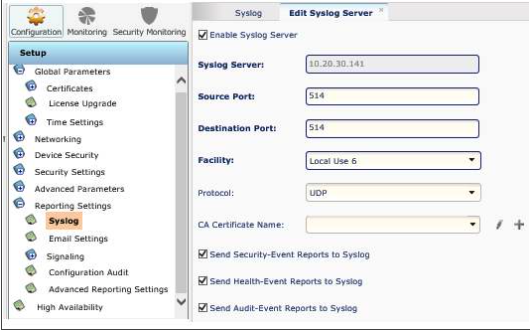
- In DefensePro Configuration, go to Setup > Reporting Settings > Syslog
- Check the Enable Syslog box
- Configure the parameters:
Server Address: IP address or FQDN of the Realm Collector Port: Realm Collector receiving port number Protocol: TCP Facility: Any desired value (sent with forwarded logs; useful for distinguishing between devices)
- Click Save