Appearance
Zscaler NSS
Realm Security integrates seamlessly with Zscaler NSS VM and Cloud based appliances, enabling intelligent routing and analysis of security event logs.
Depending on your setup, select one of the following methods to send logs to Realm
Zscaler NSS VM
Zscaler NSS VM supports sending log data to configured destinations using the generic syslog protocol in key/value format.
Data Flow:
text
Zscaler (VM based) NSS > Realm Data Connector (onprem) > Realm Cloud Backend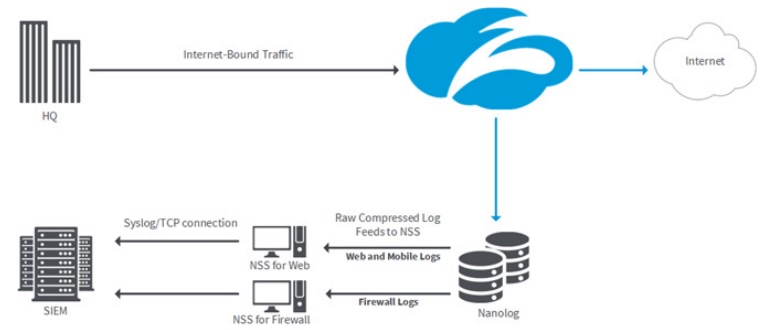
Prerequisites
- Ensure you have administrative access to your Zscaler NSS VM.
- Realm Collector is set up and running. See Realm Collector install guide for setting up a collector.
- Realm Security syslog collector IP address or FQDN.
- Realm Collector receiving port numbers. In the Realm console, go to Collectors > select collector > More actions (
...) for the Zscaler stream > View assigned ports and copy the port number listed for each NSS feed type.
Realm: Setup Source
- Login to Realm console.
- Go to Sources > Add > Zscaler ZIA / Splunk (CIM) and add a new Source.
Name:
Zscaler ZIADescription:Zscaler ZIA logs - If a collector is already set up, go to Collectors and select your collector. If not, go to Collectors > Add and give it a name and description.
- Add a Zscaler stream to the Collector. Click Add Stream.
Product Format:
Zscaler ZIA / Splunk (CIM)Source:ZscalerFraming Trailer:Unspecified - Click Add Stream.
- To view all assigned ports for Zscaler ZIA feeds, click VIEW PORTS. The modal shows receiving port numbers for each NSS feed type. You will need these when configuring each Zscaler NSS Syslog feed.
Zscaler: Setup NSS VM feed (Splunk)
Follow these steps to configure an NSS feed for firewall logs to Realm Security Data Fabric.
Use the following values:
Feed Name: Name of the feed
NSS Type: Select type
SIEM Destination Type:SIEM IP Address— enter the IP address of the Realm Data Collector VM
SIEM TCP Port: Port number from the Realm console corresponding to the NSS feed type
Feed Output Type:Splunk CIM
Note: For streaming Zscaler NSS VM logs to Microsoft Sentinel, see the separate Zscaler NSS VM Sentinel Integration guide.
Zscaler NSS Cloud
Zscaler NSS Cloud supports sending log data to configured destinations using format strings to format data into the correct schema for a given SIEM/Data store.
Data Flow:
text
Zscaler (Cloud based) NSS > Realm Cloud Backend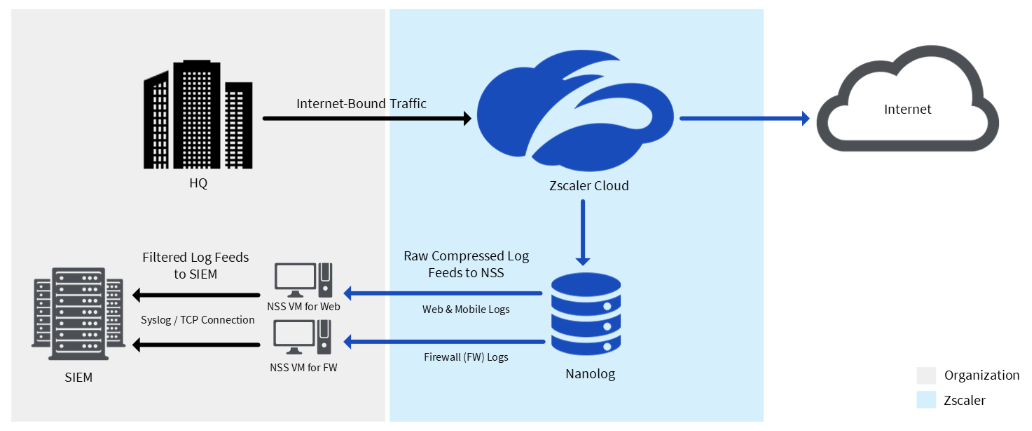
Prerequisites
- Ensure you have administrative access to your Zscaler NSS Cloud console.
- Cloud NSS allows only one feed per log type per instance. If you're already streaming a given log type elsewhere (e.g. to another SIEM), you'll need a second Cloud NSS instance for Realm. To set this up, reach out to your Zscaler account team and request an additional Cloud NSS feed.
Realm: Setup Zscaler NSS Cloud Sentinel Source
- Login to Realm console.
- Go to Sources > Add > Zscaler NSS Cloud Sentinel and add a new Source.
Name:
Zscaler NSS Cloud
Description:Zscaler NSS Cloud logs - Select Cloud HTTP, and give the input feed a name and description.
- You can provide your own token, if not, a token will be generated on creation of the feed.
- Copy your token and HTTP URL, as this will be used to configure your Zscaler NSS Cloud feeds.
Zscaler: Setup NSS Cloud feed
Follow these steps to configure an NSS feed for web logs to Realm Security Data Fabric.
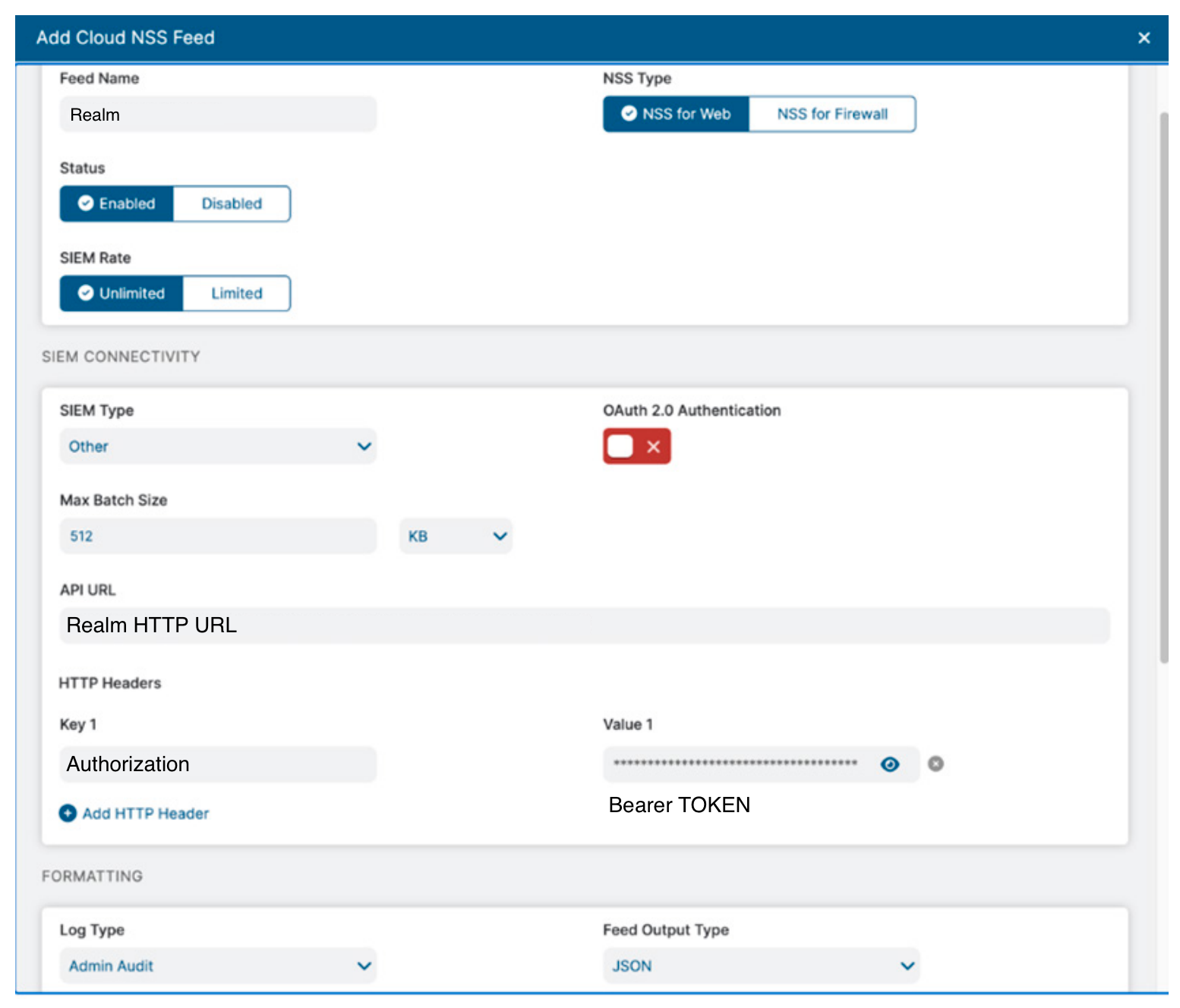
Use the following values:
Feed Name: Name of the feed
NSS Type: Select type
SIEM Destination Type:
Other
API URL: Enter HTTP URL from Realm console
HTTP Headers: Set the key to
Authorizationand set the value toBearer {Realm Token}
Log Type: Choose the log type corresponding to the NSS feed you are setting up (Web, Firewall, etc.)
Feed Output Type:
JSON— By default it sends JSON data in JSON array notation. You must disable this option so data is sent in NDJSON.
Feed Output Format: Paste the format string for the corresponding Zscaler NSS feed. Confirmed format strings for each supported log type are provided below, sourced directly from Zscaler's MS Sentinel Format Strings repo.
- Note: Ensure that OAuth 2.0 Authentication has been disabled.
Cloud NSS Sentinel format strings (JSON / .fof)
Select the tab below matching the NSS Type you're configuring, and paste the format string exactly as shown into the Feed Output Format field.
NSS Web Format String
json
{"TimeGenerated":"%d{yy}-%02d{mth}-%02d{dd},%02d{hh}:%02d{mm}:%02d{ss}","sourcetype":"zscalernss","vendor":"Zscaler","product":"NSSWeblog","version":"5.7","act":"%s{action}","Severity":"3","name":"%s{reason}","deviceEventClassId":"%s{action}","app":"%s{proto}","cat":"%s{urlcat}","dhost":"%s{ehost}","dst":"%s{sip}","src":"%s{cip}","in_bytes":"%d{respsize}","in":"%d{respsize}","outcome":"%s{respcode}","out":"%d{reqsize}","request":"%s{eurl}","rt":"%s{mon}","sourceTranslatedAddress":"%s{cintip}","requestClientApplication":"%s{ua}","requestMethod":"%s{reqmethod}","suser":"%s{login}","spriv":"%s{location}","externalId":"%d{recordid}","fileType":"%s{filetype}","reason":"%s{reason}","destinationServiceName":"%s{appname}","cn1":"%d{riskscore}","cn1Label":"riskscore","cs1":"%s{dept}","cs1Label":"dept","cs2":"%s{urlsupercat}","cs2Label":"urlsupercat","cs3":"%s{appclass}","cs3Label":"appclass","cs4":"%s{malwarecat}","cs4Label":"malwarecat","cs5":"%s{threatname}","cs5Label":"threatname","cs6":"%s{dlpeng}","cs6Label":"dlpeng","ZscalerNSSWeblogURLClass":"%s{urlclass}","ZscalerNSSWeblogDLPDictionaries":"%s{dlpdict}","requestContext":"%s{ereferer}","contenttype":"%s{contenttype}","unscannabletype":"%s{unscannabletype}","deviceowner":"%s{deviceowner}","devicehostname":"%s{devicehostname}","keyprotectiontype":"%s{keyprotectiontype}","cloudname":"%s{cloudname}","company":"%s{company}","throttlereqsize":"%d{throttlereqsize}","throttlerespsize":"%d{throttlerespsize}","bwthrottle":"%s{bwthrottle}","bwclassname":"%s{bwclassname}","bwrulename":"%s{bwrulename}","module":"%s{module}","app_risk_score":"%s{app_risk_score}","datacenter":"%s{datacenter}","datacentercity":"%s{datacentercity}","datacentercountry":"%s{datacentercountry}","dlpdicthitcount":"%s{dlpdicthitcount}","dlpidentifier":"%d{dlpidentifier}","dlpmd5":"%s{dlpmd5}","dlprulename":"%s{dlprulename}","fileclass":"%s{fileclass}","fname":"%s{filename}","filesubtype":"%s{filesubtype}","upload_fileclass":"%s{upload_fileclass}","upload_filetype":"%s{upload_filetype}","upload_filename":"%s{upload_filename}","upload_filesubtype":"%s{upload_filesubtype}","upload_doctypename":"%s{upload_doctypename}","rdr_rulename":"%s{rdr_rulename}","fwd_type":"%s{fwd_type}","fwd_gw_name":"%s{fwd_gw_name}","fwd_gw_ip":"%s{fwd_gw_ip}","zpa_app_seg_name":"%s{zpa_app_seg_name}","reqdatasize":"%d{reqdatasize}","reqhdrsize":"%d{reqhdrsize}","respdatasize":"%d{respdatasize}","resphdrsize":"%d{resphdrsize}","totalsize":"%d{totalsize}","df_hosthead":"%s{df_hosthead}","df_hostname":"%s{df_hostname}","erefererhost":"%s{erefererhost}","refererpath":"%s{erefererpath}","eurlpath":"%s{eurlpath}","reqversion":"%s{reqversion}","respversion":"%s{respversion}","ua_token":"%s{ua_token}","uaclass":"%s{uaclass}","mobappname":"%s{mobappname}","mobappcat":"%s{mobappcat}","mobdevtype":"%s{mobdevtype}","clt_sport":"%d{clt_sport}","cpubip":"%s{cpubip}","alpnprotocol":"%s{alpnprotocol}","trafficredirectmethod":"%s{trafficredirectmethod}","euserlocationname":"%s{euserlocationname}","erulelabel":"%s{erulelabel}","ruletype":"%s{ruletype}","eurlfilterrulelabel":"%s{eurlfilterrulelabel}","ourlfilterrulelabel":"%s{ourlfilterrulelabel}","eapprulelabel":"%s{eapprulelabel}","fileHash":"%s{bamd5}","sha256":"%s{sha256}","ssldecrypted":"%s{ssldecrypted}","externalspr":"%s{externalspr}","clientsslcipher":"%s{clientsslcipher}","clienttlsversion":"%s{clienttlsversion}","clientsslsessreuse":"%s{clientsslsessreuse}","cltsslfailreason":"%s{cltsslfailreason}","cltsslfailcount":"%d{cltsslfailcount}","srvsslcipher":"%s{srvsslcipher}","srvtlsversion":"%s{srvtlsversion}","srvocspresult":"%s{srvocspresult}","srvcertchainvalpass":"%s{srvcertchainvalpass}","srvwildcardcert":"%s{srvwildcardcert}","serversslsessreuse":"%s{serversslsessreuse}","srvcertvalidationtype":"%s{srvcertvalidationtype}","srvcertvalidityperiod":"%s{srvcertvalidityperiod}","is_ssluntrustedca":"%s{is_ssluntrustedca}","is_sslselfsigned":"%s{is_sslselfsigned}","is_sslexpiredca":"%s{is_sslexpiredca}","threatseverity":"%s{threatseverity}","malwareclass":"%s{malwareclass}","urlcatmethod":"%s{urlcatmethod}","bypassed_traffic":"%d{bypassed_traffic}","bypassed_etime":"%s{bypassed_etime}","deviceappversion":"%s{deviceappversion}","devicemodel":"%s{devicemodel}","devicename":"%s{devicename}","deviceostype":"%s{deviceostype}","devicetype":"%s{devicetype}","external_devid":"%s{external_devid}","flow_type":"%s{flow_type}","ztunnelversion":"%s{ztunnelversion}","productversion":"%s{productversion}","nsssvcip":"%s{nsssvcip}"}NSS DNS Format String
json
{"TimeGenerated":"%d{yy}-%02d{mth}-%02d{dd},%02d{hh}:%02d{mm}:%02d{ss}","sourcetype":"zscalernss-dns","vendor":"Zscaler","product":"NSSDNSlog","version":"5.7","act":"%s{action}","Severity":"3","name":"%s{rulelabel}","deviceEventClassId":"%s{action}","suser":"%s{login}","cs1":"%s{dept}","cs1Label":"department","cs2":"%s{reqaction}","cs2Label":"reqaction","cs3":"%s{resaction}","cs3Label":"resaction","cs4":"%s{reqtype}","cs4Label":"dns_reqtype","cs5":"%s{req}","cs5Label":"dns_req","cs6":"%s{res}","cs6Label":"dns_resp","cn1":"%d{durationms}","cn1Label":"durationms","flexString1":"%s{reqrulelabel}","flexString1Label":"reqrulelabel","flexString2":"%s{resrulelabel}","flexString2Label":"resrulelabel","cat":"%s{domcat}","src":"%s{cip}","dst":"%s{sip}","dpt":"%d{sport}","spriv":"%s{location}","suid":"%s{deviceowner}","dvchost":"%s{devicehostname}"}NSS Firewall Format String
json
{"TimeGenerated":"%d{yy}-%02d{mth}-%02d{dd},%02d{hh}:%02d{mm}:%02d{ss}","sourcetype":"zscaler-nss-fw","vendor":"Zscaler","product":"NSSFWlog","version":"5.7","Severity":"3","name":"%s{rulelabel}","deviceEventClassId":"%s{action}","act":"%s{action}","suser":"%s{login}","src":"%s{csip}","spt":"%d{csport}","dst":"%s{cdip}","dpt":"%d{cdport}","deviceTranslatedAddress":"%s{ssip}","deviceTranslatedPort":"%d{ssport}","destinationTranslatedAddress":"%s{sdip}","destinationTranslatedPort":"%d{sdport}","sourceTranslatedAddress":"%s{tsip}","sourceTranslatedPort":"%d{tsport}","proto":"%s{ipproto}","tunnelType":"%s{ttype}","dnat":"%s{dnat}","stateful":"%s{stateful}","spriv":"%s{location}","reason":"%s{rulelabel}","in_bytes":"%ld{inbytes}","in":"%ld{inbytes}","out_bytes":"%ld{outbytes}","deviceDirection":"1","cs1":"%s{dept}","cs1Label":"dept","cs2":"%s{nwsvc}","cs2Label":"nwService","cs3":"%s{nwapp}","cs3Label":"nwApp","cs4":"%s{aggregate}","cs4Label":"aggregated","cs5":"%s{threatcat}","cs5Label":"threatcat","cs6":"%s{threatname}","cs6label":"threatname","cn1":"%d{durationms}","cn1Label":"durationms","cn2":"%d{numsessions}","cn2Label":"numsessions","flexString1Label":"ipCat","flexString1":"%s{ipcat}","destCountry":"%s{destcountry}","avgduration":"%d{avgduration}","epochtime":"%d{epochtime}","cdfqdn":"%s{cdfqdn}","srcip_country":"%s{srcip_country}","cn3Label":"threat_score","cn3":"%d{threat_score}","flexString2Label":"threat_severity","flexString2":"%s{threat_severity}","ipsrulelabel":"%s{ipsrulelabel}","ips_custom_signature":"%d{ips_custom_signature}","duration":"%d{duration}","dnatrulelabel":"%s{dnatrulelabel}","recordid":"%d{recordid}","pcapid":"%s{pcapid}","eedone":"%s{eedone}","shost":"%s{devicehostname}","devicemodel":"%s{devicemodel}","devicename":"%s{devicename}","deviceostype":"%s{deviceostype}","deviceosversion":"%s{deviceosversion}","deviceowner":"%s{deviceowner}","deviceappversion":"%s{deviceappversion}","deviceExternalId":"%s{external_deviceid}","ztunnelversion":"%s{ztunnelversion}","bypassed_session":"%d{bypassed_session}","bypass_etime":"%s{bypass_etime}","flow_type":"%s{flow_type}","datacenter":"%s{datacenter}","datacentercity":"%s{datacentercity}","datacentercountry":"%s{datacentercountry}","rdr_rulename":"%s{rdr_rulename}fwd_gw_name=%s{fwd_gw_name}","zpa_app_seg_name":"%s{zpa_app_seg_name}"}NSS Audit Format String
json
{"TimeGenerated":"%d{yy}-%02d{mth}-%02d{dd},%02d{hh}:%02d{mm}:%02d{ss}","sourcetype":"zscalernss-audit","vendor":"Zscaler","product":"NSSAuditlog","version":"5.7","Severity":"3","name":"%s{category}","deviceEventClassId":"%s{action}","act":"%s{action}","cs1Label":"category","cs1":"%s{category}","cs2Label":"subcategory","cs2":"%s{subcategory}","cs3Label":"resource","cs3":"%s{resource}","cat":"%s{interface}","suser":"%s{adminid}","src":"%s{clientip}","outcome":"%s{result}","reason":"%s{errorcode}","sourceServiceName":"%s{auditlogtype}","cs4Label":"preaction","cs4":"%s{epreaction}","cs5Label":"postaction","cs5":"%s{epostaction}","deviceExternalId":"%d{recordid}"}NSS Tunnel Format String
json
{"TimeGenerated":"%d{yy}-%02d{mth}-%02d{dd} %02d{hh}:%02d{mm}:%02d{ss}","sourcetype":"zscalernss-tunnel","vendor":"Zscaler","product":"NSSTunnellog","version":"5.7","severity":"3","spt":"%d{srcport}","dst":"%s{destvip}","reason":"%s{eventreason}","cs4Label":"locationname","cs4":"%s{locationname}","src":"%s{sourceip}","deviceEventClassId":"%s{tunnelactionname}","cs5Label":"tunneltype","cs5":"%s{tunneltype}","suser":"%s{vpncredentialname}","deviceExternalId":"%d{recordid}","olocationname":"%s{olocationname}","ovpncredentialname":"%s{ovpncredentialname}","dtz":"%s{tz}","name":"%s{event}"}Note: For streaming Zscaler NSS Cloud logs to Splunk, see the separate Zscaler NSS Cloud Splunk Integration guide.
Note: For streaming Zscaler NSS Cloud logs to CrowdStrike NG-SIEM / Falcon LogScale, see the separate Zscaler NSS Cloud CrowdStrike Integration guide.
Support
For additional details, refer to the official Zscaler NSS documentation.
If you encounter any issues or require assistance, contact Realm Security support.
Event Metadata
The following additional metadata fields will be included with the events. _sourceCatgeory is only set when sending data to Splunk and is not applied for data going to other SIEMs.
| Feed Type | Field Name | Value |
|---|---|---|
| All feeds | _sourceCategory | zscaler/zia-splunk |
| Feed Type | Field Name | Value |
|---|---|---|
| ZIA WEB | source_type | zscalernss-web |
| ZIA TUNNEL | source_type | zscalernss-tunnel |
| ZIA FIREWALL | source_type | zscalernss-fw |
| ZIA DNS | source_type | zscalernss-dns |
| ZIA AUDIT | source_type | zscalernss-audit |
References
- Adding NSS Feeds for Firewall Logs
- Understanding Nanolog Streaming Service
- General Guidelines for NSS Feeds and Feed Formats
- NSS Feed Output Format for Firewall Logs
- ZPA and Splunk Deployment Guide
- [Zscaler and CrowdStrike Deployment Guide] (internal upload, Use Cases 6-7: Cloud-to-Cloud CrowdStrike Falcon LogScale / NG-SIEM configuration)