Appearance
Securonix Integration
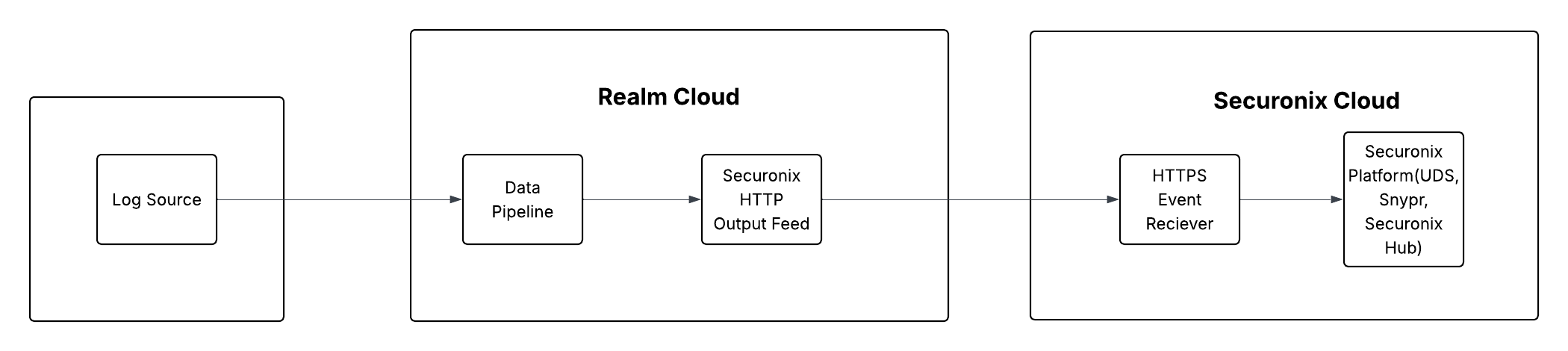
Send Realm Data to Securonix
This guide walks you through connecting Securonix to Realm as a destination. The integration uses Securonix's HTTP Event Receiver — Realm forwards log data over HTTPS using an API token, where Securonix parses and ingests the events for analysis and detection.
Note: Each Securonix HTTP Event Receiver is configured for a specific log parser (data type). Because each receiver is unique to a data type, you must configure a separate Realm Pipeline for every data type you want to ingest into Securonix.
Prerequisites
- Active Securonix account with administrator access
- Access to the Realm Security console
- SSL must be enabled on the Securonix HTTP Event Receiver
- The Securonix API token for your tenant
1. Configure an HTTP Event Receiver in Securonix
Each HTTP Event Receiver in Securonix is tied to a specific parser (log/data type). You will need to repeat this process for each data type you plan to forward from Realm.
Log in to the Securonix console.
Navigate to Menu > Threat Management > Security Data > Data Ingestion.
Click Add Data Source and select HTTP Event Receiver as the ingestion method.
Configure the event receiver:
Name:
<descriptive name, e.g., Realm-Fortigate>
Parser:<select the parser matching your data type, e.g., FORTIGATE>
Structure:JSON RecordIn the Authentication section, select API Token as the authentication type.
Copy the API Token displayed — you will need it when configuring the Realm output feed.
Important: Store the API token securely. Treat it as a secret and do not share it or commit it to version control.
Ensure SSL is enabled for the event receiver endpoint.
Save the event receiver and copy the Endpoint URL — it will be unique to this receiver and parser.
Note: Repeat steps 3–8 for each additional data type you want to forward to Securonix. Each data type requires its own HTTP Event Receiver with the appropriate parser selected.
2. Configure the Securonix Destination in Realm
Because each Securonix HTTP Event Receiver is parser-specific, you will configure one Realm Pipeline (with its own Destination and Output Feed) per data type.
In the Realm Security console, navigate to Destinations and create a new destination for Securonix.
Add a new Output Feed and configure the following fields:
Name:
<descriptive name matching the data type, e.g., Securonix - Fortigate>
Method:HTTP
Endpoint:<your Securonix HTTP Event Receiver URL>
Authentication Type:Token
Header Key:Authorization
Header Value:Bearer <your Securonix API Token>Ensure the endpoint uses HTTPS — SSL must be enabled on the Securonix receiver.
Save the Output Feed. Realm will begin forwarding log data to the Securonix HTTP Event Receiver.
Repeat this process — creating a new Pipeline with its own Destination and Output Feed — for each additional data type you want to ingest into Securonix.
Note: For more details on Securonix HTTP Event Receiver configuration, refer to the Securonix HTTP Event Receiver Integration guide.
Support
If you encounter any issues or require assistance, contact Realm Security support.