Appearance
Checkpoint Firewall
Realm Security integrates with Checkpoint Firewall for monitoring of firewall data.
Prerequisites
- Ensure you have access to your Checkpoint firewall SmartConsole.
- Realm Collector is set up and running. See Realm Collector install guide for setting up a collector.
- Realm Security Collector IP address or FQDN.
Choosing a Source Format
Realm supports two source formats for Checkpoint Firewall logs. Choose the format that matches how you configure log export in SmartConsole:
Note: Use
Checkpoint Firewall(CEF) if you configure the Log Exporter to export in Common Event Format (CEF). CEF provides structured key-value fields and is the recommended format for richer field mapping and parsing.Use
Checkpoint Firewall Syslogif you configure the Log Exporter to export in Syslog format. Select this format when your environment requires plain syslog output or when CEF is not supported by your gateway version.
The format you choose in Realm must match the Data Manipulation > Format setting in your Checkpoint Log Exporter configuration. Mismatched formats will result in unparsed or incorrectly parsed log data.
Setup Checkpoint Firewall Source in Realm
- Login to Realm console.
- Go to Sources > Add and add a new Source, choosing the format that matches your Checkpoint export configuration (see Choosing a Source Format above).
Name:
Checkpoint Firewall
Description:Checkpoint Firewall logs
Format:Checkpoint Firewall(for CEF) orCheckpoint Firewall Syslog(for Syslog) - If a collector is already set up, go to Collectors and select your collector. If not, go to Collectors > Add and give it a name and description.
- Add a Checkpoint Firewall stream to the Collector. Click Add Stream.
Product Format:
Checkpoint Firewall(for CEF) orCheckpoint Firewall Syslog(for Syslog)
Port: Select a unique port for this collector
Source:Checkpoint Firewall - Click Add Stream.
- Take note of the port assigned to the Checkpoint Firewall stream. You will need it when configuring Checkpoint Firewall to forward log messages to Realm.
Setup Checkpoint Firewall Log Export in SmartConsole
For CLI instructions, see the Checkpoint CLI Log Exporter guide.
Otherwise, follow the Log Exporter - Check Point Log Export guide. Details and screenshots are provided below.
Create a new Log Exporter/SIEM object via Objects > Server > New Log Exporter/SIEM.
- For General > Target Server, provide the IP address or FQDN of the Realm Security Collector.
- For General > Target Port, provide the port number assigned to the Checkpoint Firewall stream.
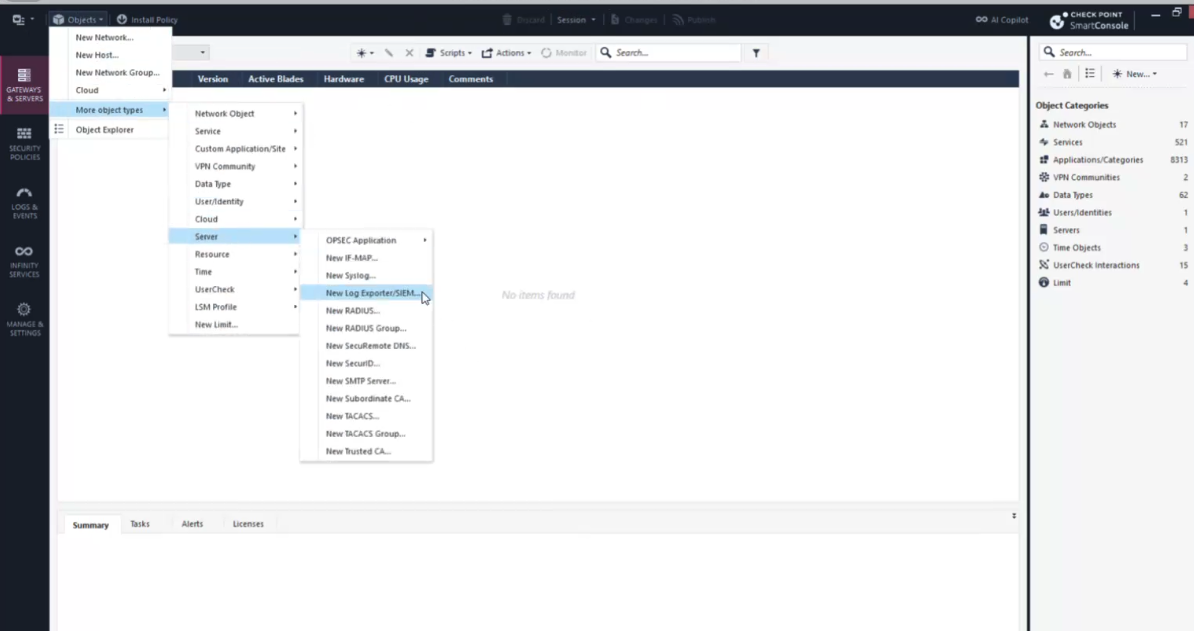

- For Data Manipulation > Format, select the format that matches your Realm source configuration:
Common Event Format (CEF)— if you selected theCheckpoint Firewallsource format in RealmSyslog— if you selected theCheckpoint Firewall Syslogsource format in Realm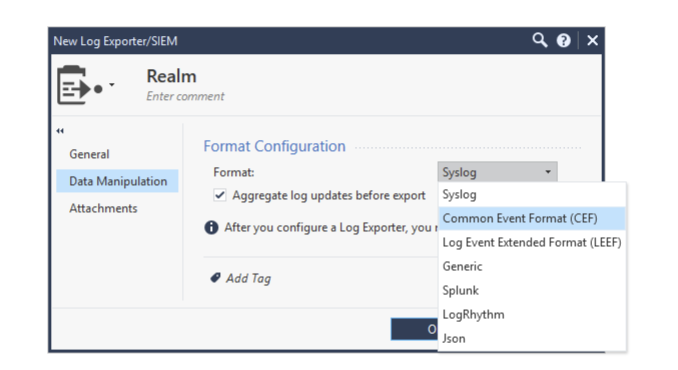
- Click OK.
Configure the Management Server or Dedicated Log Server / SmartEvent Server object via Gateways & Servers > Management Server or Dedicated Log Server/SmartEvent Server > Logs > Export.
- Click [+] and select the Log Exporter / SIEM object you configured earlier.
- Click OK.
Install the Database via Menu > Install database.
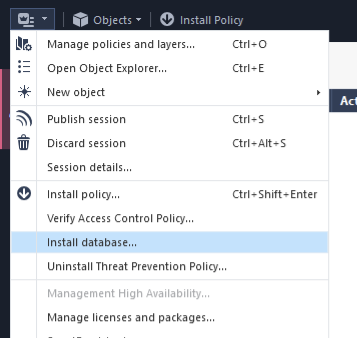
- Select all objects.
- Click Install.
Important: The format selected in Data Manipulation > Format on the Checkpoint side must match the source format configured in Realm. Selecting
Common Event Format (CEF)in Checkpoint requires theCheckpoint Firewallsource format in Realm; selectingSyslogrequires theCheckpoint Firewall Syslogsource format. Use the port assigned to the Checkpoint stream in the Collector regardless of format.
For more in-depth documentation, see the Log Exporter Administration Guide.
Support
For additional details, refer to the official Checkpoint Firewall documentation.
If you encounter any issues or require assistance, contact Realm Security support.