Appearance
Proofpoint TAP Integration
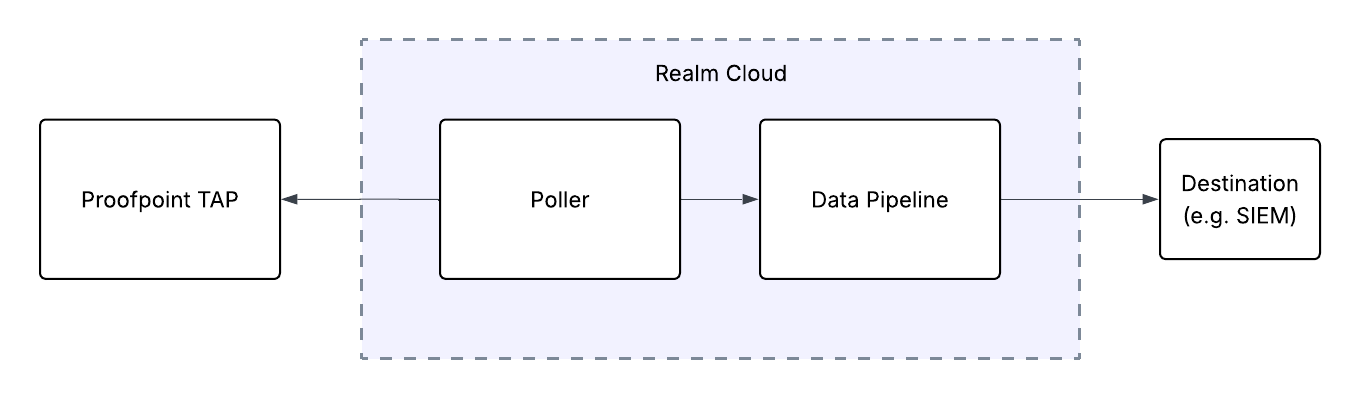
Send Proofpoint TAP Email Threat Events to Realm
This guide walks you through connecting Proofpoint TAP to Realm. The integration uses a polling-based approach — Realm Cloud periodically queries the Proofpoint TAP SIEM API to retrieve email threat events, then forwards them through your data pipeline to your configured destination.
Prerequisites
- An active Proofpoint TAP account with administrator access
- Access to the Realm Security console
Generate API Credentials in Proofpoint TAP
- Log in to the Proofpoint TAP dashboard.
- Navigate to Settings.
- Click New Token to generate API credentials.
- Enter a name for the token and click Generate.
Important: Copy and save the Token Service Principal and Token Secret immediately — you will not be able to view them again. You will need both values when configuring the integration in Realm.
Configure the Integration in Realm
- Create a new Source.
Name:
Proofpoint TAP - Add a new Input feed.
Type:
Proofpoint TAP
Service Principal:<your Proofpoint TAP Token Service Principal>
Secret:<your Proofpoint TAP Token Secret>
Once saved, the Realm poller will begin retrieving email threat events from the Proofpoint TAP SIEM API at regular intervals. The data is forwarded through your data pipeline to your configured destination (e.g., SIEM).
Note: The Realm source will fetch events from the
https://tap-api-v2.proofpoint.com/v2/siem/all. For more details, refer to the Proofpoint TAP SIEM API documentation.