Appearance
Forcepoint NGFW
Send Forcepoint NGFW Logs to Realm
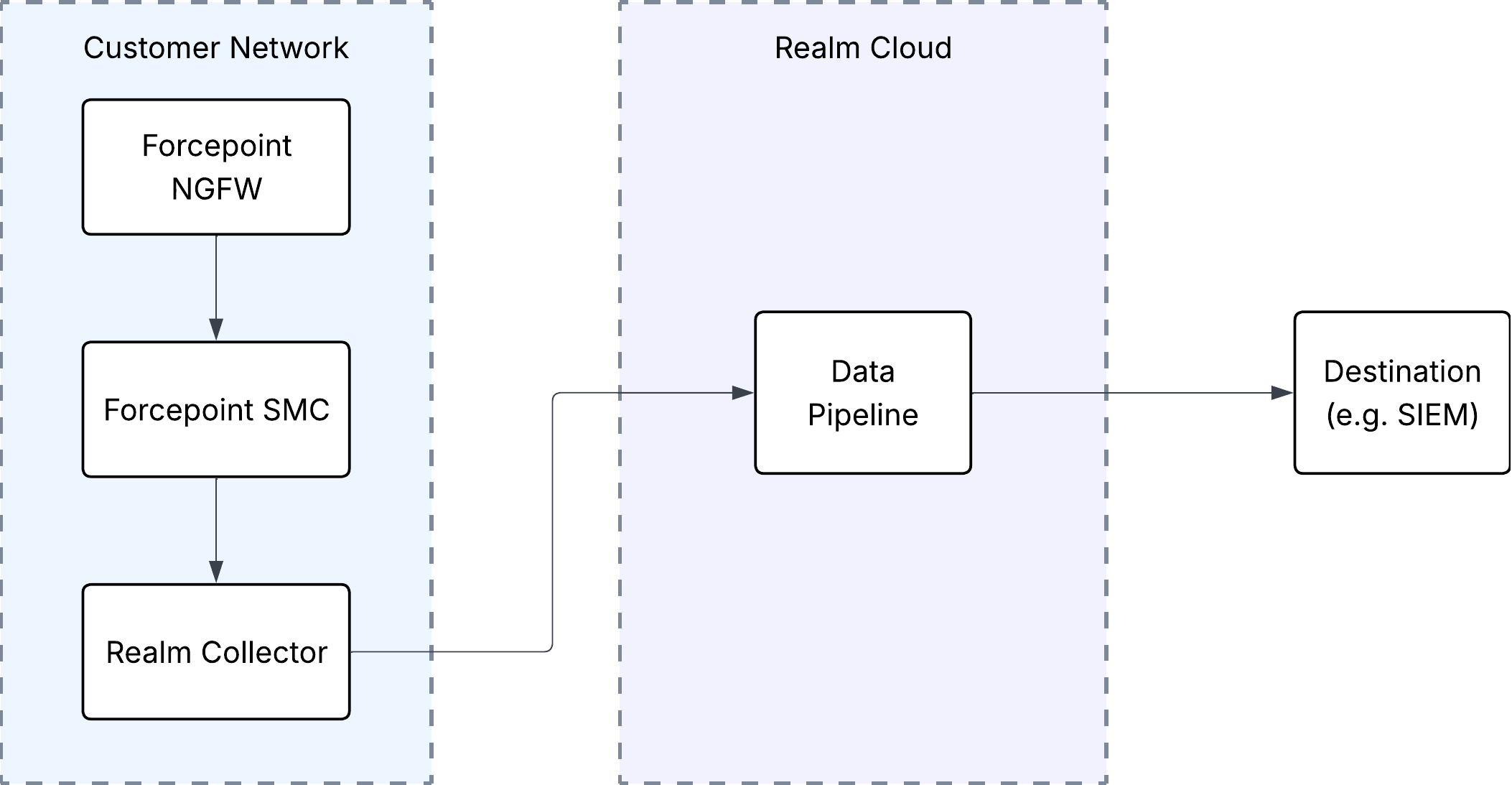
Realm integrates with Forcepoint Next Generation Firewall (NGFW), enabling intelligent routing and analysis of firewall event logs. The Forcepoint Security Management Center (SMC) Log Server forwards logs to an on-premises Realm Collector, which then relays them to Realm Cloud over a secure connection.
Note: Realm supports CEF output from Forcepoint only. When configuring log forwarding in the SMC, ensure the Format is set to
CEF.
Prerequisites
- Administrative access to the Forcepoint SMC Management Client.
- Realm Collector is set up and running. See Realm Collector install guide for setting up a collector.
- Realm Collector IP address or FQDN.
- Logging is enabled on the relevant access control rules. In the SMC Management Client, ensure the Log Level of your access control rules is not set to
None. To include byte-volume data (thein/outfields), set the Connection Closing option to Log Accounting Information on the relevant rules. See Forcepoint's Define logging options for Access rules.
Setup Forcepoint NGFW Source in Realm
Log in to the Realm console.
Go to Sources > Add > Forcepoint NGFW and add a new Source.
Name:
Forcepoint NGFWUnder Transport, select Collector as the transport method.
If a collector is already set up, go to Collectors and select your collector. If not, go to Collectors > Add and give it a name and description. Click Continue
Add a Forcepoint NGFW stream to the Collector.
Stream Name: Choose a name for this stream
Port: Select a unique port for this collector
Timezone: Select the timezone your Forcepoint logs are set toNote: Take note of the port you assigned to the Forcepoint NGFW stream. You will need it when configuring the SMC to forward syslog messages to Realm.
Click Create Stream.
Forward SMC Logs to Realm
Configure the SMC Log Server to forward firewall logs to the Realm Collector.
In the SMC Management Client, go to Dashboard > Servers / Devices.
Right-click the Log Server from which you want to forward logs, then select Properties.
Click the Log Forwarding tab, then click Add.
Configure the forwarding rule:
Target Host:
<IP address or FQDN of the Realm Collector>
Service:TCP
Port:<port assigned to the Forcepoint NGFW stream in Realm>
Format:CEF
Data Type: Firewall log data
Filter: Optional — limit which log entries are forwardedNote: The Format field must be set to
CEF. Other formats are not supported by Realm.Click OK. The rule activates immediately.
If a firewall governs traffic between the Log Server and the Collector host, add a rule permitting outbound traffic on the configured port from the Log Server IP to the Collector IP.
Support
For additional details, refer to the official Forcepoint documentation:
- Add log forwarding rules to Log Servers
- Forwarding log data from Log Servers to external hosts
- Enable TLS protection for log or audit data forwarding
- Forcepoint NGFW Documentation
If you encounter any issues or require assistance, contact Realm support.
Event Metadata
The following additional metadata fields will be included with the events:
| Field Name | Value |
|---|---|
| _sourceCategory | forcepoint/ngfw |