Appearance
Prisma Access Integration
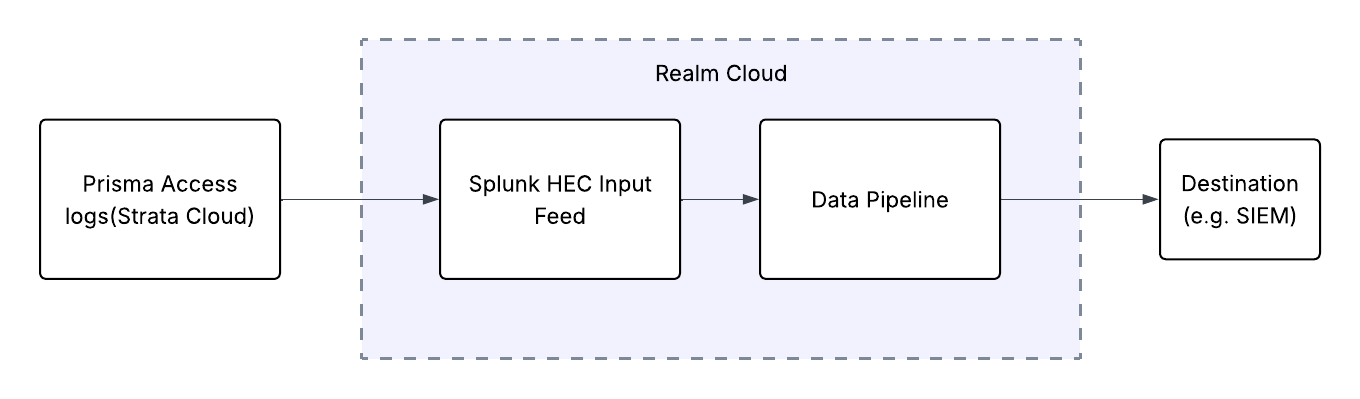
Send Prisma Access Logs to Realm
This guide walks you through connecting Prisma Access to Realm. Prisma Access uses the Strata Logging Service to forward logs to external HTTPS endpoints — Realm exposes a Splunk HEC-compatible endpoint that receives these logs directly, then routes them through your data pipeline to your configured destination.
Prerequisites
- Active Prisma Access deployment managed via Strata Cloud Manager
- Administrator access to the Strata Cloud Manager and Strata Logging Service
- Access to the Realm Security console
Configure the Integration in Realm
Before configuring Prisma Access, create a Source and Splunk HEC input feed in Realm to obtain the endpoint URL and token.
In Realm, go to Sources > Add Source.
Enter a name and set the format:
Name:
Prisma Access
Format:Prisma AccessClick Save.
On the Select Transport Method step, click Add Input Feed.
Select Splunk HEC and give it a name (e.g.,
Prisma Access HEC).Click Save.
Click
...> Edit on the newly created input feed.Click the eye icon in the token field to reveal the token value.
Copy the HEC Endpoint URL and Token.
Important: Save the HEC Endpoint URL and Token now — you will need them in the next step.
Configure Log Forwarding in Strata Cloud Manager
Log in to Strata Cloud Manager.
Navigate to Settings > Strata Logging Service > Log Forwarding.
Click Add to create a new forwarding profile.
Configure the HTTPS destination using the values copied from Realm:
Name:
Realm Security
Destination Type:HTTPS
Payload Format:Splunk HEC
URI:<your Realm HEC Endpoint URL>
Token:<your Realm HEC Token>Select the log types to forward (e.g., Traffic, Threat, URL Filtering, Authentication).
Click Save and confirm the forwarding profile is active.
Once saved, Prisma Access will begin forwarding logs to Realm via the Splunk HEC endpoint.
Note: For more details on configuring HTTPS log forwarding in Strata Logging Service, refer to the Palo Alto Networks documentation.