Appearance
Corelight NDR Integration
Send Corelight NDR Logs to Realm
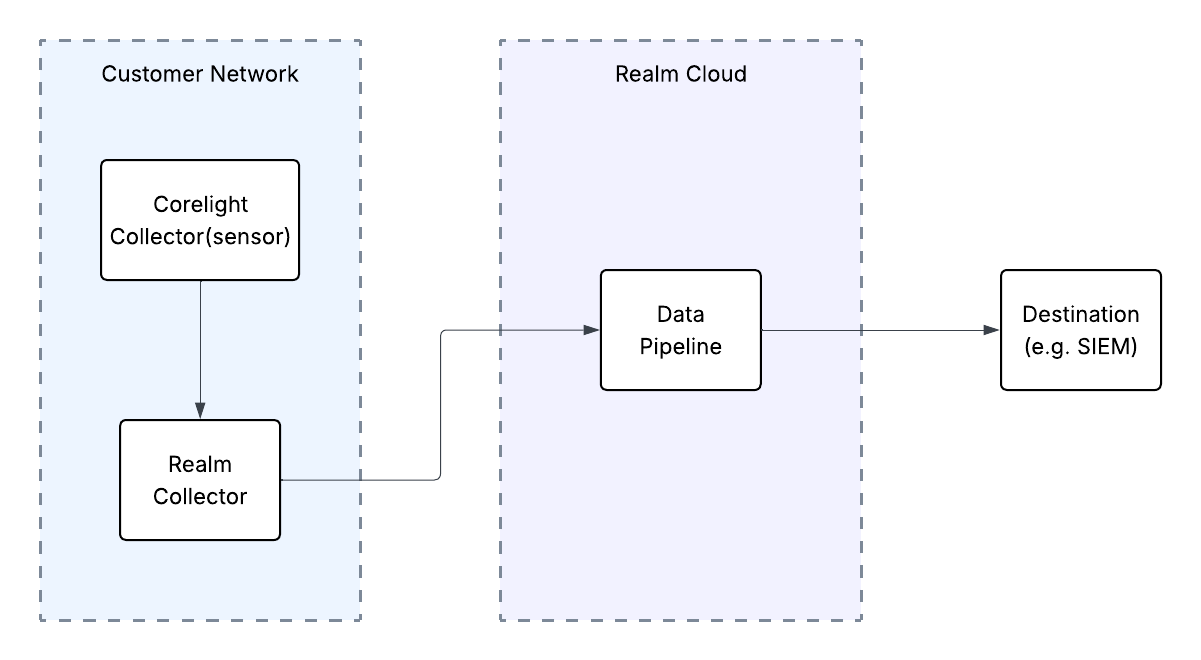
This guide walks you through connecting Corelight NDR to Realm. The integration uses a collector-based approach — a Realm Collector is deployed inside your network alongside the Corelight sensors, receives JSON log exports from Corelight, and forwards them through your data pipeline to your configured destination.
Prerequisites
- Active Corelight NDR deployment with administrative access
- Access to the Realm Security console
- A Realm Collector installed and running within the same network segment that receives log traffic from your Corelight sensors. See the Realm Collector install guide for setup instructions.
- The IP address or FQDN of the Realm Collector host
- The receiving port number assigned to the Corelight NDR stream (found in Collectors > select collector after creating the stream below)
Setup Corelight NDR Source in Realm
- Log in to the Realm console.
- Go to Sources > Add > Corelight NDR and add a new Source.
Name:
Corelight NDR
Description:Corelight NDR logs - If a collector is already set up, go to Collectors and select your collector. If not, go to Collectors > Add and give it a name and description.
- Add a Corelight NDR stream to the Collector. Click Add Stream.
Product Format:
Corelight NDR
Source:Corelight NDR - Click Add Stream.
- Take note of the port assigned to the Corelight NDR stream. You will need it when configuring Corelight to forward logs to the Realm Collector.
Configure Corelight NDR Log Export
Follow Corelight's documentation to export logs in JSON format, directing output to the IP address or FQDN of your Realm Collector on the port assigned to the Corelight NDR stream above.
Note: The Realm Collector must be reachable from the Corelight sensors over the network. Ensure any firewalls or security groups between the sensors and the Collector allow TCP traffic on the assigned port.
Support
If you encounter any issues or require assistance, contact Realm Security support.