Appearance
Cisco Duo Integration
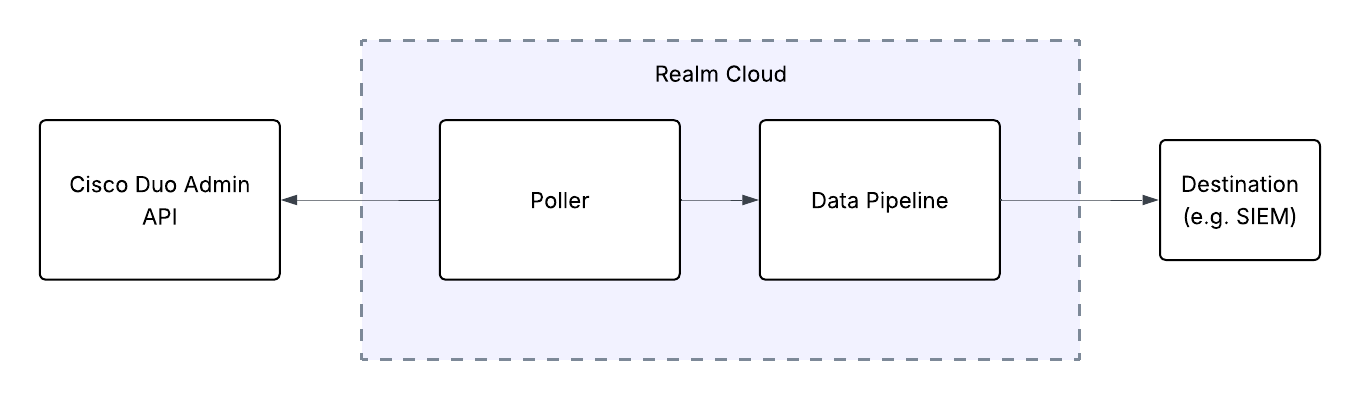
Send Cisco Duo Logs to Realm
This guide walks you through connecting Cisco Duo to Realm. The integration uses a polling-based approach — Realm Cloud periodically queries the Duo Admin API to retrieve authentication, administrator, and telephony logs, then forwards them through your data pipeline to your configured destination.
Prerequisites
- An active Cisco Duo account with the Owner administrator role (only Owners can create or modify an Admin API application)
- Access to the Realm Security console
- Realm IP addresses to add to the Admin API application's Networks for API Access list, if you restrict API access by network (contact Realm Support for the current list)
Generate API Credentials in Cisco Duo
- Log in to the Duo Admin Panel as an administrator with the Owner role.
- Navigate to Applications > Application Catalog.
- Locate the Admin API entry in the catalog and click + Add.
- Under Permissions, select Grant read log. This permission allows the application to read authentication, offline access, telephony, and administrator action logs. No other permissions are required.
- (Optional) In Networks for API Access, add the Realm Cloud IP addresses to restrict which networks can use this application:
- Contact Realm Support and request the current list of Realm Cloud egress IP addresses if you do not have them.
- Enter each Realm Cloud IP address in CIDR notation (e.g.,
10.0.0.1/32for a single IP). - Add all provided Realm IPs to the list.
Note: If you restrict Networks for API Access, only requests from the listed IP addresses are permitted, and requests from Realm are rejected unless its IPs are included. If you leave this field empty, the application can be accessed from any network.
- Click Save Changes.
- On the application page, copy the Integration key, Secret key, and API hostname.
Important: Treat the secret key like a password. Copy and save it securely — do not share it or send it by email. You will enter it in the Realm Security console.
Note: The API hostname is unique to your account and has the form
api-XXXXXXXX.duosecurity.com. Use it exactly as shown in the Duo Admin Panel.
Note: For more details, refer to the Duo Admin API documentation.
Configure the Integration in Realm
- In Realm, go to Sources > Add Source.
- Select the
Cisco Duosource, then enter a name for the source (e.g.Cisco Duo). - Click Next.
- Enter the credentials copied from Duo:
Integration Key:
<your Duo integration key>
Secret Key:<your Duo secret key>
API Hostname:<your Duo API hostname> - Click Save.
- Select the desired destination for this data and click Save.
Once saved, the Realm poller will begin retrieving Cisco Duo logs from the Admin API at regular intervals. The data is converted to JSON and forwarded through your data pipeline to your configured destination (e.g., SIEM).